The short-form script format that fits on a sticky note (plus the Claude prompt)
Last updated November 2026 · 20 min · Free · Beginner
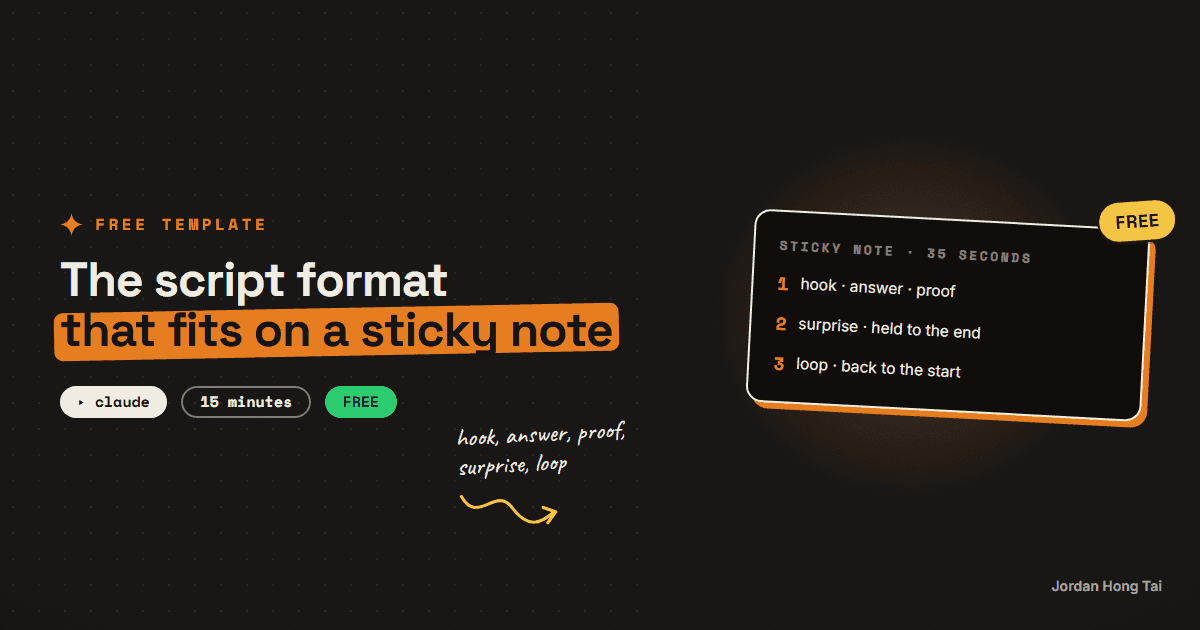
The best short-form video script format fits on a sticky note: hook, answer, proof, surprise, loop. In 20 minutes you'll have the note, a Claude Project that writes every script in that shape, and a second prompt that checks each beat before you film.
The best short-form video script format is five beats short enough to fit on a sticky note: hook, answer, proof, surprise, loop. You write those five beats, you ask for the follow only after the payoff, and you keep the whole thing around 35 seconds. This guide gives you the note, a Claude prompt that writes scripts in that shape, and a second prompt that checks them.
What you'll have when you're done
- The five-beat sticky note, written out so you can stick it next to your screen
- A Claude Project that turns any topic into a script in that shape, around 135 to 150 spoken words
- A self-check prompt that marks each beat pass or fail and hands back a fixed version
- Your first finished script, read out loud and timed
- [SCREENSHOT: the five-beat sticky note next to a finished script in Claude]
Before you start
- A Claude account. The free plan is fine. (The prompts also work in ChatGPT.)
- One topic you want to make a video about, plus the one result a viewer gets from it.
- A phone with a stopwatch, for step 6.
- 20 minutes.
Step 1: Write the sticky note
Grab a sticky note, or open a blank note on your phone, and copy these five lines:
1. HOOK     One sentence that promises a result. From frame one. No intro.
2. ANSWER   Give them the answer right away.
3. PROOF    The steps. After each one, say what it gets them.
4. SURPRISE Hold one thing back. Drop it near the end.
5. LOOP     The last line leads back into the start.
CTA comes only after the payoff.
Each beat has one job:
- Hook. The first sentence is a promise of a result, spoken over the first frame. No "hey guys", no "in this video", no name. The viewer decides fast, and an intro gives them nothing to decide with.
- Answer. Say the answer straight after the hook. Most beginners save it for the end, and the viewer leaves before they get there. Giving it away early feels wrong, but the proof is what keeps them.
- Proof. Show the steps, and after each one add a short clause of what it gets the viewer: "so your week is planned before Monday." A step with no result is a step they skip.
- Surprise. Pick the most interesting thing in your topic and keep it out of the first half. Drop it in the last few seconds. It is the reward for staying.
- Loop. Write the last line so it hands back into the opening subject. When the video restarts, the first line sounds like the next sentence, and some people watch it again.
Check it worked: you have five lines on a note you can see while you write, plus the CTA rule underneath.
Step 2: Set your length target
Pick your length before you write, or the script decides for you. On our own channel, we pulled 83 of our Shorts from the last 90 days and grouped them by length:
- 31 to 35 seconds held best: 52% of the video watched on average, and 18% of viewers still there at the end.
- 46 to 60 seconds held worst: 38% watched on average, and 6% still there at the end.
So the target in this guide is about 35 seconds, roughly 135 to 150 spoken words. That is one channel's data, not a law, but it is a better starting point than a guess.
Check it worked: you know your target: around 35 seconds, 135 to 150 words.
Step 3: Set up the script writer in Claude
In Claude, click Projects, then New Project, and name it Script Writer. A Project is a workspace with saved instructions, so every chat inside it already knows the format.
Open Set project instructions and paste this:
You write short-form video scripts (Reels, Shorts, TikTok) in one
fixed shape. Every script has these five beats, in this order:

1. HOOK: one sentence that promises a result to the viewer. It is the
   very first line, spoken over the first frame. No intro, no greeting,
   no "in this video", no name.
2. ANSWER: give the answer or outcome in the next one or two sentences.
   Never save the answer for the end.
3. PROOF: the steps, two to four of them. After each step, add a short
   clause that says what that step gets the viewer, in their terms
   ("so your whole week is planned before Monday").
4. SURPRISE: the single most interesting fact, tip or twist in the
   topic. Keep it out of the first half. Place it in the last 15% of
   the script, right before the loop line.
5. LOOP: the final content line hands back into the opening subject,
   so the video sounds continuous when it replays. It should re-open
   the topic, not repeat the hook word for word.

CTA: only after the loop line, and only if I give you one. One short
sentence. Never put a CTA before the payoff.

Rules:
- Total length: 135 to 150 spoken words (about 35 seconds).
- Write the way people talk: short sentences, everyday words, no jargon
  without a plain explanation in the same sentence.
- Connect beats with "but" or "so", never "and then".
- No hype words, no emojis, no made-up numbers. Only use a number if I
  gave it to you.

Output format:
- The script, one beat per paragraph, each paragraph labeled
  [HOOK], [ANSWER], [PROOF], [SURPRISE], [LOOP], [CTA].
- Under the script: the word count and the estimated length at
  4 words per second.
- Then two alternative hook lines, each a different kind of promise.
Check it worked: the instructions are saved and show in the project sidebar. [SCREENSHOT: Script Writer project with instructions saved]
Step 4: Write your first script
Start a new chat inside the project and fill in this brief. The more specific the result line, the better the hook.
Topic: [what the video is about]
Who it's for: [one line, e.g. "beginners who use Claude for work"]
The result they get: [what changes for them, in their words]
The steps: [2 to 4 steps, rough notes are fine]
The surprise: [the most interesting thing you know about this topic,
or write "find one" and Claude will pick from your notes]
CTA (optional): [e.g. "Comment TEMPLATE and I'll send it"]

Write the script.
Here is a script in this shape, so you know what you are aiming for. It is 147 words.
[HOOK] You can make Claude stop writing long answers, and it takes
one setting.

[ANSWER] Put your rules in a Project once, and every chat follows them.

[PROOF] First, make a Project and call it Short Answers. So now
every chat you open in there starts with your rules loaded. Second,
paste three rules: answer in five lines, lead with the answer, no
intro. So you stop scrolling past three paragraphs to find one
sentence. Third, test it with a question you ask every week. So you
see the difference in one reply, not after a month.

[SURPRISE] But the rule that does the most work is the one that says
what to leave out. Write a short "never" list, like never restate my
question and never end with a summary, and the answers get shorter
again.

[LOOP] Because a long answer was never Claude's fault. It just
didn't have your rules.
Look at the order. The result is in the first line and the answer in the second. Every step gets a "so" clause, and the best tip is held back. The last line runs straight into "You can make Claude stop writing long answers" when the video restarts.
Check it worked: you have a labeled script with a word count between 135 and 150 and two spare hooks underneath.
Step 5: Run the self-check
Drafts drift. A step loses its result clause, or the surprise slides into the middle. Paste the script into a new chat (inside the project or outside it) with this prompt:
Check this short-form video script against the five-beat format.
Mark each item PASS or FAIL, and quote the line that decides it.

1. HOOK: the first sentence promises a result. No greeting, intro,
   name or "in this video" before it.
2. ANSWER: the answer is given in the first two or three sentences.
3. PROOF: every step is followed by what it gets the viewer.
   List any step that has no result clause.
4. SURPRISE: there is one held-back fact or twist, and it appears in
   the last 15% of the script, not earlier.
5. LOOP: the last content line leads back into the opening subject.
   Read the last line, then the first line. Does it flow?
6. CTA: if there is a CTA, it comes after the payoff, not before.
7. LENGTH: word count is 135 to 150. Give the exact count.
8. FLOW: no "and then" between beats. No jargon left unexplained.
   No numbers that weren't in my brief.

Then give me a fixed version that passes all eight, changing as
little as possible. Show the new word count.

Script:
[paste your script here]Check it worked: every line comes back PASS, or you have a fixed version that does.
Step 6: Read it out loud and time it
Open your phone's stopwatch and read the script at the speed you would talk to a friend. Writing that looks fine can still trip you up out loud.
- Over 40 seconds: cut a step, not the surprise.
- A line you stumble on: rewrite it the way you just said it.
- The loop line: read it, then read the hook straight after. If it sounds like one sentence carrying on, it works.
Check it worked: you read it in about 35 seconds without stumbling, and the last line flows back into the first. [SCREENSHOT: stopwatch next to the script]
FAQ
How long should a short-form video script be?
Aim for about 35 seconds, which is roughly 135 to 150 spoken words. On our own channel, Shorts between 31 and 35 seconds held best (52% watched on average) and Shorts between 46 and 60 seconds held worst (38%). That is one channel's data, so treat it as a starting target and test your own.
Why give the answer away at the start?
Because a viewer who has to wait for the answer usually leaves before it arrives. Saying it early tells them the video is worth their time. The proof and the held-back surprise are what keep them watching after that.
What counts as a surprise?
The single most interesting thing in your topic: a tip most people miss, a result that sounds backwards, or the step that does the most work. Keep it out of the first half and drop it in the last few seconds, right before the loop line.
Where does the call to action go?
After the payoff, never before it. A "follow for more" in the first ten seconds asks for something before you've given anything, and it hands the viewer a reason to leave. Keep it to one short line at the end, or put it in the caption.
Does this work with ChatGPT instead of Claude?
Yes. The instructions are plain text, so paste them into a Custom GPT or the top of any chat. Claude Projects just make it easier, since every chat in the project already has the format loaded.
Can I use this for TikTok, Reels and YouTube Shorts?
Yes. The five beats are about how a viewer watches, not about one app. Write the script once, then change only the caption and the call to action for each platform.
Related guides
A hook lab without trial reels: test 3 openers per reel when Instagram locks you out
Instagram's trial reels feature needs roughly 1,000 followers. My account had 13. That is not a small gap you close in a month, so the entire trial-reel A/B protocol was unusable and I had to replace it with something that works at any account size. This guide is that replacement: three hooks per reel in different archetypes, one variant shipped per platform so every reel gets three real reads instead of one, every post tagged so the clicks are separable, and a set of hard decision rules that stop you retiring a hook on noise.
Make AI sound exactly like you (the voice file trick)
AI content sounds like AI because the model has never met you. In 15 minutes you'll build the one file that fixes it: a voice file the AI loads before writing anything.
I stopped filming my reels (my AI avatar reads the script)
You'll set up a pipeline where a text file becomes a talking-head clip of your own AI avatar, in your voice, with no camera. Claude Code calls HeyGen's API from a skill file, waits for the render, and drops the clip in your editing folder. After the 30-minute setup, a reel starts with a paragraph, not a tripod.
Get the next build in your inbox
One email a week: the newest guides, plus one thing I only share with the list.
No spam. Unsubscribe anytime.
Build alongside others
Join the free community and share what you're shipping.

Jordan Hong Tai
I've scaled products to over 500K users, and now I build AI systems in public from a balcony in Tokyo.