See how much traffic ChatGPT and Perplexity send you in GA4: the AI Assistant channel, what it misses, and a custom channel group
Last updated October 2026 · About 30 minutes · Free (Google Analytics 4) · Comfortable
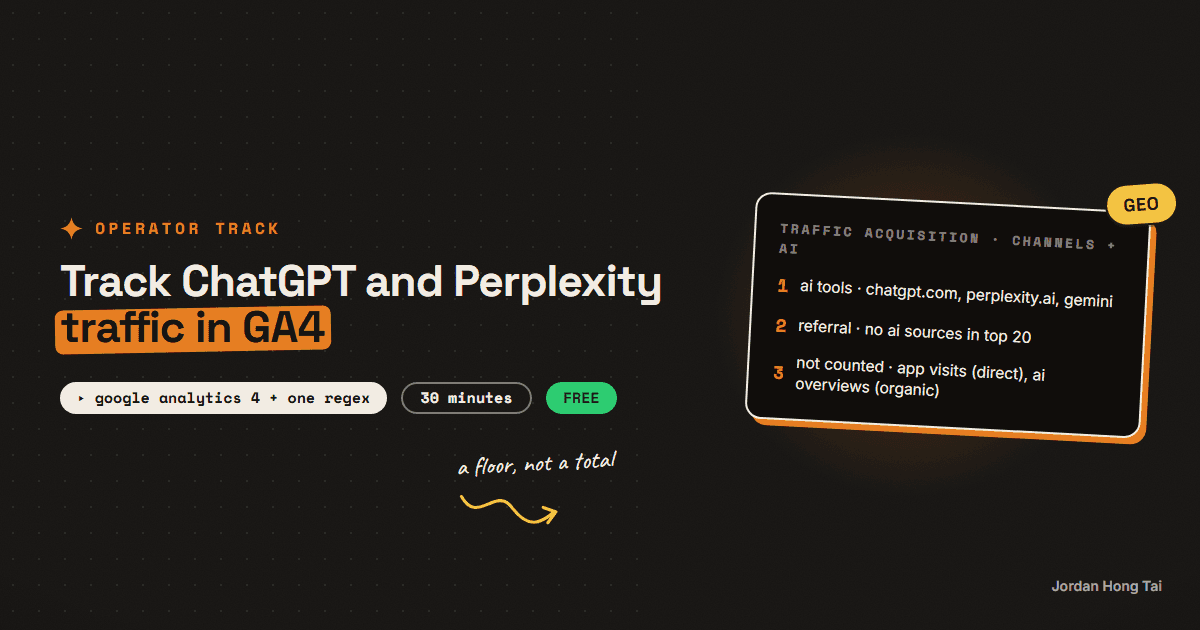
GA4's default channel group now has an AI Assistant channel. Google's help page says it covers visits from sources like ChatGPT, Gemini, DeepSeek, Copilot and Grok, and that it excludes AI Overviews and AI Mode. It doesn't print the full list. So before you report AI traffic to anyone, check what actually lands in it, and catch the rest with one regex.
GA4's default channel group now has an AI Assistant channel. Google's help page says it's for visits from sources like ChatGPT, Gemini, DeepSeek, Copilot and Grok, and that it excludes Google's AI Overviews and AI Mode. What the page doesn't do is print the full list of sources.
That matters the moment someone asks you "how much traffic do we get from AI?" If Perplexity visits are still sitting in Referral, the built-in number is low, and you won't know unless you check.
This guide is the 30-minute check I'd run on any site before I report AI traffic to a team. You check what the built-in channel catches, build a custom channel group with one regex, read the traffic by landing page and write down what GA4 can't see. It pairs with the tracking spreadsheet, which measures whether AI answers name you. This one measures who clicks through.
What you'll have when you're done
- A list of AI sources in your property and which channel each one lands in today
- A custom channel group with an AI channel that sits above Referral
- A landing-page view of AI traffic, so you know which pages the assistants send people to
- A short monthly note for your team with the number and its known gaps
- [SCREENSHOT: GA4 Traffic acquisition with the custom AI channel row and its sessions]
Before you start
- A GA4 property with at least a few weeks of data, and Editor access (custom channel groups live in Admin).
- Free. Nothing here needs a paid tool. Looker Studio is optional for the monthly view.
- About 30 minutes.
Google's pages for this: the default channel group definitions and custom channel groups.
Step 1: Find every AI source already in your data
Open Reports > Acquisition > Traffic acquisition. Add Session source as a secondary dimension, set the date range to the last 90 days and search the table for each of these, one at a time.
Search terms for the source column
chatgpt   openai   perplexity   gemini   copilot
claude    deepseek   grok   you.com   meta.ai
For each hit, write down the source and the channel it's in. Some of these sources may not exist in your data yet, and that's fine.
Check it worked: you have a short list like "chatgpt.com: AI Assistant, perplexity.ai: Referral". If every source is already in AI Assistant, the built-in channel is enough for you and you can skip to Step 4.
Step 2: Copy the default group into a custom one
Go to Admin > Data display > Channel groups and create a new channel group by copying the default. Name it something your team will understand, like "Channels + AI".
A standard GA4 property gets two custom channel groups on top of the default, and each one can hold up to 50 channels, so don't burn both on experiments.
Check it worked: the new group shows the same channels as the default, including AI Assistant. Nothing in your reports has changed yet.
Step 3: Add one AI channel, above Referral
Add a new channel called AI tools. Set its condition to Session source matches regex and paste this:
chatgpt\.com|chat\.openai\.com|perplexity\.ai|gemini\.google\.com|copilot\.microsoft\.com|claude\.ai|chat\.deepseek\.com|grok\.com|you\.com|meta\.ai
Add any other source you found in Step 1. Escape the dots, and don't shorten it to something like .*ai.*, which would also catch email and half the web.
Then move AI tools above Referral. Google's help page says traffic is assigned to the first channel whose definition it matches, so a channel sitting below Referral never gets anything. Save.
Check it worked: Traffic acquisition, switched to your new channel group, shows an AI tools row. Perplexity visits that were in Referral in Step 1 now land there. Custom groups apply to past data, so the row has history straight away.
Step 4: Read AI traffic by landing page
I think the total is the least useful number here. What helps is which pages the assistants send people to. Open Reports > Engagement > Landing page, add your new channel group's channel as a secondary dimension and filter to AI tools (or AI Assistant if you skipped the custom group).
Look at three things for each page: sessions, engaged sessions and key events.
AI landing pages (one row per page per month)
page | ai sessions | engaged sessions | key events | cited in spreadsheet? (y/n)
The last column links this to the tracking spreadsheet. A page that answers get cited from and that also gets clicks is the page to protect and update first. The pages AI answers cite guide covers what those pages tend to look like.
Check it worked: you can name the three landing pages that get the most AI traffic, and say whether those visitors engage more or less than the site average.
Step 5: Write down what GA4 can't see
AI traffic in GA4 is a floor, not a total, and I'd say so in the report every time. Three gaps come up on almost every site.
App visits with no referrer. Clicks from mobile and desktop apps often arrive without a referrer and land in Direct. ChatGPT often adds utm_source=chatgpt.com to the links it shows, which helps, but don't count on every assistant doing that.
AI Overviews and AI Mode. Google's help page says these are excluded from the AI Assistant channel. The clicks come from google.com, so they count as Organic Search and you can't split them out in GA4.
Visibility without clicks. An answer can name you and send nobody. That's what the spreadsheet and the crawler log check are for.
Monthly AI traffic note
AI sessions this month: [N] ([+/- %] vs last month)
Top 3 AI landing pages: [page], [page], [page]
Sources: [chatgpt.com N], [perplexity.ai N], [other N]
Not counted: app visits with no referrer (in Direct),
AI Overview / AI Mode clicks (in Organic Search)
Check it worked: your note has the number, the top pages and the two "not counted" lines. If someone reads only the first line, they still see the trend.
Step 6: Check it again in a month
Re-run Step 1 once a month. New assistants show up as new sources, and Google can change what the built-in channel covers. When a new one appears in Referral, add it to the regex and save. The custom group re-applies to past data, so last month's report fixes itself.
Check it worked: your Referral channel has no AI source in its top 20 sources.
What I'd do differently
Check before you build. I expected to need the custom group everywhere. If the built-in channel already catches every AI source in your data, you don't.
Report pages, not just a total. The landing-page view is what changes what the team writes next.
Put the gaps in the report. A small AI number with its blind spots written next to it is more useful than a bigger number nobody can defend.
FAQ
Does GA4 track ChatGPT traffic automatically?
Partly. GA4's default channel group has an AI Assistant channel that Google says covers visits from sources like ChatGPT, Gemini, DeepSeek, Copilot and Grok. Visits only count when a referrer or tag reaches GA4, so some AI visits still show up as Direct.
Is Perplexity in GA4's AI Assistant channel?
Google's help page doesn't name Perplexity in its examples and doesn't publish the full source list. Open Traffic acquisition, add Session source as a secondary dimension and search for perplexity to see which channel your Perplexity visits land in. If they sit in Referral, the custom channel group in this guide catches them.
Does GA4 count Google AI Overviews as AI traffic?
No. Google's default channel group page says the AI Assistant channel excludes Google's AI Overviews and AI Mode. Clicks from those arrive from google.com and are counted as Organic Search, so you can't separate them in GA4.
Will a custom channel group change my old reports?
It applies to past data. Google's help page says custom channel groups can be applied to your reports retroactively. Audiences are the exception: a channel group change only affects audience membership from then on.
How many custom channel groups can I make?
A standard GA4 property can have 2 custom channel groups on top of the default one, and a GA4 360 property can have 5. Each group can hold up to 50 channels.
Why is my AI traffic so small?
For most sites it is small, and some of it is hidden. App visits often arrive with no referrer and show as Direct, and AI Overview clicks count as Organic Search. Report the number with those gaps written next to it, and watch the trend and the landing pages rather than the total.
Related guides
Track whether AI answers name you, with a spreadsheet and Claude
Ask ChatGPT the same buying question twice and you will often get two different lists of sources. NJIT researchers measured it across 11,500 real queries and found AI Overview source sets overlapping at a Jaccard score of 0.66 between two runs of the identical query, against 0.78 for the ordinary results page. A newer paper ran 50 questions across 6 engines 15 times each and found five of the six still naming brands they had never named before at run 15. So a single audit is not a measurement, it is one draw from a distribution. The repetition is the product, and you can get it with a spreadsheet for nothing.
See which AI bots read your site, in 10 minutes: GPTBot, OAI-SearchBot, ClaudeBot, PerplexityBot and the robots.txt that keeps you cited
OpenAI, Anthropic and Perplexity each send at least two different bots to your site. One collects pages that may train the next model, another indexes pages so the chatbot's search can cite them, and a third only shows up when a person asks about you. If your robots.txt treats them as one thing called AI, you're probably blocking the wrong one.
The page types AI answers cite most, and how to build each one for your business
Your homepage is the page you polish most and the page AI answers cite least. In Wix's March 2026 study of 1,056,727 citations across ChatGPT, Google AI Mode and Perplexity, homepages took 5.3% of them. Ranked list pages took 21.9%, articles that answer one question took 16.7%, and product pages took 13.7%. So the question is not whether your site is good. It is whether you have built the page types the engines actually pull from, and most small business sites have built one of them, if that.
Get the next build in your inbox
One email a week: the newest guides, plus one thing I only share with the list.
No spam. Unsubscribe anytime.
Build alongside others
Join the free community and share what you're shipping.

Jordan Hong Tai
I've scaled products to over 500K users, and now I build AI systems in public from a balcony in Tokyo.