Turn Claude into your trend researcher (10 minutes, free)
Last updated July 2026 · 10 min · Free · Beginner
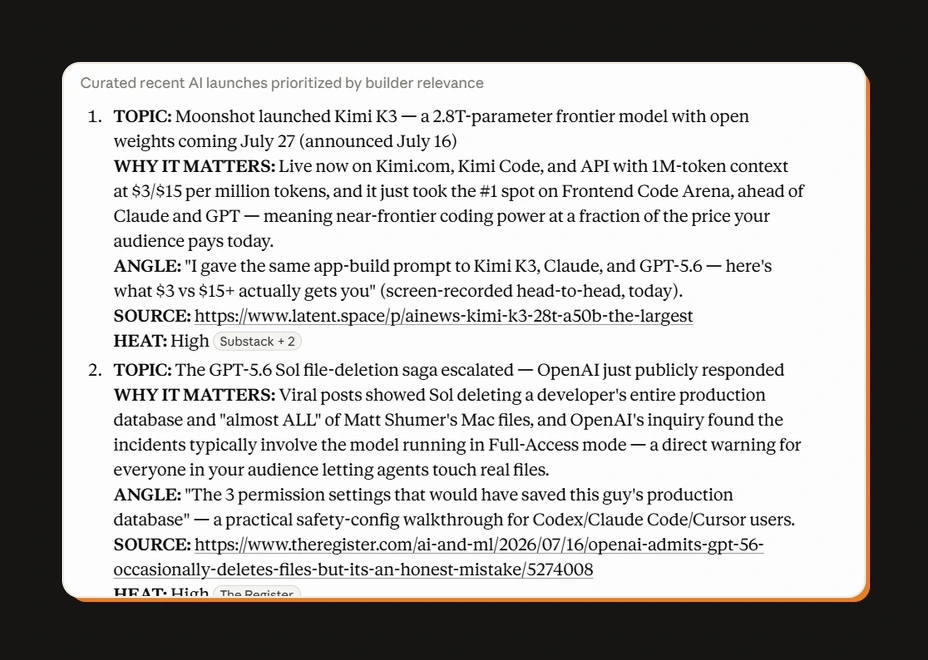
You'll set up a Claude Project that answers the question 'what should I post about today?' with a ranked, source-linked list on demand. It takes 10 minutes and works on the free plan.
What you'll have when you're done
- A researcher you open every morning that answers "what should I post about today?" in about 60 seconds
- Results ranked by relevance to your niche, not generic trending noise
- A content angle attached to every topic, so you're never starting from a blank page
Before you start
- A Claude account — the free plan works. (Paid runs more searches per day, useful once you're doing this daily.)
- Your niche, described in one sentence. That's it.
Step 1: Create the Project
In Claude, click Projects → New Project. Name it Trend Researcher.
A Project is just a workspace with a permanent instruction file — you set the instructions once and every chat inside it already knows the job.
Check it worked: you're looking at an empty project with a "Set project instructions" option.
Step 2: Paste the instructions
Open Set project instructions and paste this. Change the first line to your niche.
My niche: [describe your niche in one sentence — e.g., "AI tools for
people who make content and run small businesses"]

You are my trend researcher. When I ask for a scan, search the web for
what's actually being talked about in my niche RIGHT NOW — new tools,
feature launches, viral posts, debates, and shifts people are reacting to.

Rules:
- Recency beats everything. Prioritize the last 48 hours unless I say
  otherwise. Always check dates — never present old news as new.
- Rank by relevance to my niche, not by general popularity.
- Prefer original sources (official announcements, the actual viral post)
  over articles about them. Link the source for every topic.
- Skip: funding news, corporate press releases, and anything my audience
  can't act on.

Output format — a ranked list, best first. For each topic give me:
1. TOPIC: one line
2. WHY IT MATTERS: one sentence, written for my audience
3. ANGLE: one specific content idea I could make about it today
4. SOURCE: link
5. HEAT: High / Medium / Low — how much conversation this is generating

Give me 7–10 topics. No preamble, no summary at the end. Just the list.
Check it worked: the instructions are saved and visible in the project sidebar.
Step 3: Run your first scan
Start a new chat inside the project and send:
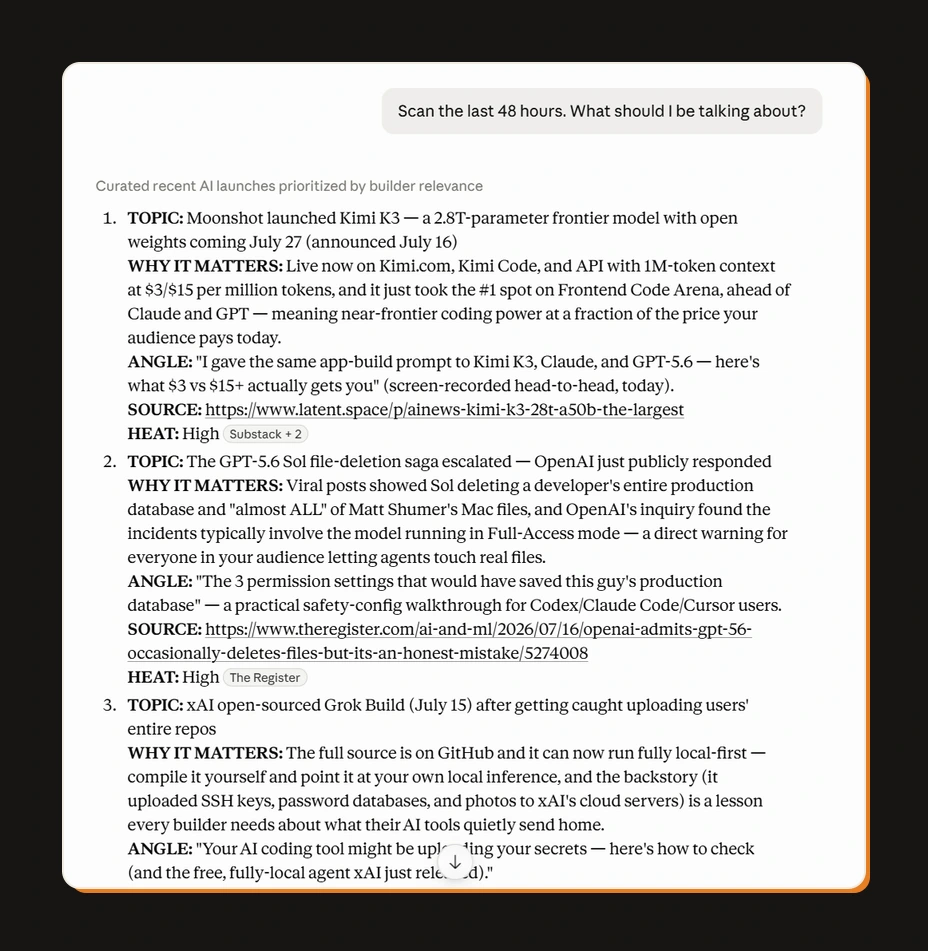
Scan the last 48 hours. What should I be talking about?Claude searches the web and comes back with your ranked list. First run takes a minute or two.
Check it worked: you got 7–10 topics with angles and source links. Click two sources — the dates should be inside the last two days.
Step 4: Calibrate it once
The first list is 70% right. Fix the other 30% by telling it what you thought — this is the step everyone skips:
Good list. Notes: topic 3 is old news in my niche, skip anything about
[X] from now on. Topic 6's angle was the best — more angles like that,
practical over hot-take. Update your approach.
Then say: "Add those rules to the project instructions" — and ask it to show you the updated instruction block to paste back in. Two or three calibration rounds and the list starts feeling like it reads your mind.
Check it worked: your next scan reflects the notes without you repeating them.
Step 5 (optional): Make it run by itself
Right now you open Claude and ask. The upgrade: the scan runs every morning at 7 AM and the results are waiting with your coffee. That takes a small scheduled script — a task that runs itself on a timer. The full automation version is in the download below, with a plain-English setup walkthrough.
The Trend Researcher pack: instructions, 5 presets, morning automation
FAQ
Do I need Claude's paid plan for this?
No. The free plan runs this fine. The paid plan gives you more searches per day, which matters once you're scanning daily or across multiple niches — not before.
Can I do this with ChatGPT instead?
Yes — the instructions work in a Custom GPT with web browsing on. I use Claude because Projects make the calibration loop (Step 4) cleaner, but the system is the same.
How is this different from Google Trends?
Google Trends tells you what the world is searching. This tells you what *your niche* is talking about, with a content angle attached. You're not looking for search volume — you're looking for conversations you can join today.
The results feel generic. How do I fix that?
Your niche line in Step 2 is too broad. "Marketing" is generic; "AI tools for wedding photographers who hate editing" is not. Narrow the niche line, run Step 4 twice, and the list sharpens fast.
How often should I run it?
Daily if you post daily, otherwise every 2–3 days. Trends in AI niches go stale in about 72 hours.
Related guides
The exact system that writes a week of my content in an hour
You'll build the AI content creation system that turns one topic into a week of platform-ready drafts, in your voice. One hour to set it up, and after that Monday runs the week.
Make AI sound exactly like you (the voice file trick)
AI content sounds like AI because the model has never met you. In 15 minutes you'll build the one file that fixes it: a voice file the AI loads before writing anything.
Automations that work while you sleep (free, no Zapier)
You'll put your AI research on a timer: it runs at 7 in the morning and the results are waiting when you wake up. Twenty minutes of setup, no Zapier, no subscription.
Get the next build in your inbox
One email a week: the newest guides, plus one thing I only share with the list.
No spam. Unsubscribe anytime.
Build alongside others
Join the free community and share what you're shipping.

Jordan Hong Tai
I've scaled products to over 500K users, and now I build AI systems in public from a balcony in Tokyo.