Sell AI product photos to small online shops: the Higgsfield cost per image, what Fiverr sellers ask, and the label rule
Last updated October 2026 · An afternoon for the first set of ten and the pitch · Higgsfield free tier to $59/mo; about 10 cents an image on Plus; Fiverr and Upwork free to list · Beginner
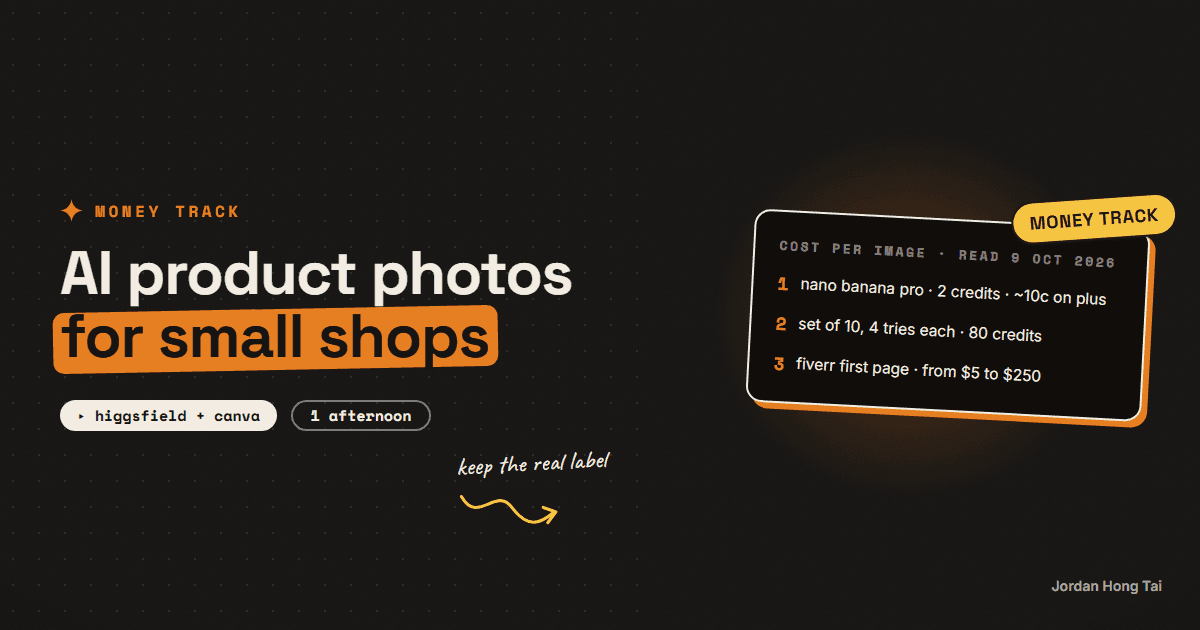
One lifestyle product photo made with Nano Banana Pro on Higgsfield costs 2 credits, about 10 cents on the $59 Plus plan. On Fiverr, the first page of AI product photography gigs started at $5 to $250, and half started at $15 or less. The image is close to free. The service is keeping the real label, passing the marketplace's first-image rule, and handing back a set the shop can upload.
One lifestyle product photo made with Nano Banana Pro on Higgsfield costs 2 credits. On the $59 Plus plan that's about 10 cents an image. On Fiverr, the first page of "AI product photography" gigs I read on 9 October 2026 started at $5 to $250, and half of them started at $15 or less.
So the image itself is close to free. I think what a small shop is actually paying for is somebody who takes their phone photo and keeps the real product exactly as it is. Then that person puts it in a scene that looks like the brand and hands back files the shop can upload without breaking the marketplace's rules.
This guide is the cost sheet from Higgsfield's own pricing page, read on 9 October 2026, the asking prices from Fiverr and Upwork the same day, the workflow that keeps the label honest, and the pitch. Results vary a lot. None of this is a forecast of what you or anyone will earn. It's what an image costs and what people ask for a set.
What you'll have when you're done
- A per-image and per-set cost sheet you can fill in for any Higgsfield plan
- One finished set of ten images for a real product, made from a phone photo
- A check that catches the two ways AI ruins a product photo, the label and the scale
- A clear line on what Etsy and Amazon allow in the first image slot
- A pitch you can send to a shop owner with their own product in it
- [SCREENSHOT: the seller's original phone photo next to three finished lifestyle shots with the label unchanged]
Before you start
- A Higgsfield account. Higgsfield runs several image models in one place, including Nano Banana Pro, Seedream and GPT Image, plus product placement tools. There's a free tier to test on. The paid plans are in step 1.
- One real product you can photograph, yours or a friend's. A candle, a mug, a bottle of skincare, anything with a label on it is the best test, because the label is what breaks.
- A phone and a window. Daylight from the side, a plain background, the product filling most of the frame.
- A free background remover. Canva, Photoroom or the one built into your phone's photo app all work.
- A Fiverr or Upwork profile, free to list.
- An afternoon.
Higgsfield: higgsfield.ai
Disclosure: the Higgsfield link on this page is an affiliate link. If you subscribe through it I earn a commission at no extra cost to you. I use Higgsfield on the builds in this guide; the workflow works the same on any plan, including the free tier.
There's no download pack for this one. The cost sheet and the check list are in the steps, so you can copy them from the page.
Step 1: Do the cost sheet before the pitch
Higgsfield charges in credits, and every model has its own price per image. Here is what the pricing page listed on 9 October 2026 for the models that matter for product work.
| Model on Higgsfield | Credits per image | Good for |
|---|---|---|
| Nano Banana Pro | 2 | Lifestyle scenes from a reference photo |
| Nano Banana Pro 4K | 4 | The hero image, when the shop wants print size |
| Nano Banana 2 | 2 | Fast variations of a scene |
| Seedream | 1 | Backgrounds and textures |
| GPT Image | 1 | Scenes with clean text, like a sign behind the product |
| Banana Placement | 1 | Putting a product into an existing scene |
| Product Placement | 0.25 | Cheap placement tests |
And here is what a credit costs on each plan, from the same page.
| Plan | Price | Credits a month | Cost per credit | One Nano Banana Pro image |
|---|---|---|---|---|
| Starter | $19 a month | 270 | about $0.070 | about 14 cents |
| Plus, monthly | $59 a month | 1,200 | about $0.049 | about 10 cents |
| Plus, yearly | $47 a month | 1,200 | about $0.039 | about 8 cents |
| Ultra, yearly | $99 a month | 3,000 | about $0.033 | about 7 cents |
Now the part people skip, and the one I got wrong at first. You don't get ten good images from ten generations. I'd plan on about four tries for every image you keep, because the first ones usually get the light, the scale or the label wrong. So a set of ten finished images is about 40 generations, which is 80 credits on Nano Banana Pro. That's about $5.60 on Starter and about $3.90 on Plus monthly. Starter's 270 credits covers about three sets a month.
Cost sheet (one row per client set)
plan:                    starter / plus monthly / plus yearly
cost per credit:         0.070 / 0.049 / 0.039
images kept:             ______  (usually 10)
tries per kept image:    ______  (start at 4)
credits per try:         2 (nano banana pro) / 4 (4k hero)
credits used:            kept x tries x credits per try
tool cost:               credits used x cost per credit
your time:               ______ minutes  (cutout, check, crops, export)
price for the set:       ______
Check it worked: fill the sheet for one set of ten. If you can't say what a set costs you in credits and in minutes, you aren't ready to quote.
Step 2: Read what the market asks, with the date on it
Asking prices aren't earnings. Here's what I could read on 9 October 2026.
Fiverr. A search for "ai product photography" showed 6,000+ results. I wrote down the starting price on all 48 gigs on the first page. They ran from $5 to $250. Three started at $5, five at $10 and sixteen at $15, so 24 of the 48 started at $15 or less. Six started at $20, and the rest climbed from $25 up to $100, $160, $180 and one at $250 for Amazon listing images. A starting price is the cheapest package, usually one to three images, so it isn't a per-image rate and I can't tell you what each package includes.
Upwork. Upwork's own cost page says photographers on the platform cost $25 to $45 an hour. That's the human shoot this service replaces for a small shop, before the photographer's travel, props and studio.
What I think the two say together: the cheap end of Fiverr is selling the button, and the shops that pay $50 and up are paying for a set that looks like one brand and passes the marketplace's checks. The tool cost under all of it is about 10 cents an image.
Check it worked: write the Fiverr range and the Upwork rate in your sheet with today's date. Re-read them in a month, because both move.
Step 3: Keep the real product pixels
This is the one rule that separates a service from a liability. Image models redraw whatever they're given. Hand one a photo of a candle and ask for "this candle on a marble bathroom shelf", and you'll often get a candle that looks right from across the room and has a different label up close. A letter changes. The logo shifts. The jar gets taller.
So never ask the model to redraw the product. Ask it to build the scene, and put the real product into it.
- Shoot the product on a plain background in daylight, straight on and at a three-quarter angle. Two photos, sharp, product filling about 80% of the frame.
- Cut it out. Run the photo through the background remover and save a PNG with a transparent background. This is the product, and nothing touches it from here.
- Make the scene. In Higgsfield, use Banana Placement or Nano Banana Pro with the cutout as the reference, and describe the scene, the light and the angle. Ask for the light to come from the same side as your photo.
- Put the real cutout back on top. If the model redrew the product even slightly, lay your original cutout over its version in Canva or Photopea, match the size, and add a soft shadow underneath. Now the label is the real label, every time.
- Do the hero last. Once a scene works, rerun it on Nano Banana Pro 4K for the one image the shop will use as its banner.
Scene prompt (paste with the product cutout as the reference image)
Place this exact product, unchanged, on [surface] in [room or setting].
Soft daylight from the [left/right], matching the light in the reference.
Keep the label, logo, colours and proportions exactly as in the reference.
Shallow depth of field, the product sharp, the background softly blurred.
[one or two props that fit the brand], nothing in front of the product.
Square format, the product about 40% of the frame.
Check it worked: open the finished image and the original photo side by side at 100% zoom. Read every word on the label out loud from both. If one letter is different, you put the real cutout back on top and you check again.
Step 4: Check the rules before the client uploads it
This is the part that tells a shop owner you know their marketplace better than the $5 gig does.
Etsy. Etsy's listing image requirements, as indexed from its policy pages on 9 October 2026, ask sellers to use original photos of the actual item buyers will receive, not renderings or stock photos, with narrow exceptions like mockups for personalised items in the extra image slots. Its Seller Policy also asks sellers to represent items accurately in listings and listing photos. Etsy's own page blocked my browser, so check the current wording yourself. The safe reading is the workflow in step 3: the real product photo, placed in a scene, and the first image a straight photo of the item.
Amazon. Amazon's main image rule, as quoted in its own seller forums, is a professional photograph of the actual product on a pure white background, with no mockups or illustrations in that slot. Lifestyle images go in the secondary slots. Confirm the current spec in your Seller Central image guide, because sizes differ by marketplace.
Shopify. Shopify doesn't review product photos the way the marketplaces do. The shop's own customers do. An image that makes a product look bigger, glossier or a different colour than what arrives is how a shop earns returns and one-star reviews.
So the deliverable I'd send is built around those rules:
- Image 1: the real photo, cleaned up, on white. No AI scene.
- Images 2 to 6: lifestyle scenes from step 3, with the real cutout.
- Images 7 and 8: a close-up of the label and a scale shot next to a hand or a common object, both real photos.
- Images 9 and 10: two crops for social, 4:5 for Instagram and 9:16 for stories.
Check it worked: image 1 is a real photograph and a stranger could guess the product's size from image 8. If either is false, the set isn't ready.
Step 5: Pitch the shop with their own product
I wouldn't pitch with a portfolio of other people's products, honestly. Pick a shop whose listing photos are dark or cluttered, take one of their existing photos, and make one before and after with the workflow above. It costs you about 10 cents and twenty minutes.
Subject: one of your [product] photos, redone

Hi [name], I took the main photo from your [product] listing and put
the same product into a lifestyle shot. The label and colours are
your real photo, not an AI redraw, so it's safe to use on Etsy.

[before / after image]

I do this as a set: ten images per product, the first a clean shot
on white for the marketplace and the rest in scenes that match your
brand, with crops for Instagram. If you'd like a set for your next
listing, send me two phone photos and I'll do the first one at half
price.

Jordan
Check it worked: the shop owner can see the difference in the image without reading the email. If they need the email to understand it, make a better before and after.
Step 6: Price per product, then per month
A shop doesn't need ten images once. It needs ten images every time it lists something new. So I'd start per product and move the shop onto a monthly number as soon as it lists more than two products a month.
- Per product set. One price for ten images, one round of changes. Easy to buy the first time.
- Monthly. A set number of products a month, delivered within three days of the photos arriving. On Plus monthly, eight sets is about $31 of credits out of a $59 plan, so one shop pays for the plan and the rest is your time.
I'd quote per set first and offer the monthly price on the second order, when the shop has seen what a set does to their listing.
Check it worked: your offer says how many images, which slots they're for, how fast, and how many rounds of changes. If it only says a price, rewrite it.
The honest part about this market
I'd guess the images keep getting cheaper, and they're already cheap. Anyone with a $19 plan can make a nice-looking scene, and the shop owner can too, if they spend a weekend learning it. So the scene alone isn't something you can charge much for for long.
What a shop will pay for is the label staying right, the first image passing Etsy or Amazon, a set that looks like one brand across forty listings, and somebody else doing it. I'd say that's a real service. I'd also say it takes an hour or two a set done properly, which is why a $5 gig only works for people who skip the check.
What I'd do differently
Shoot the product well first. I've found a sharp phone photo in daylight saves more time than any model setting.
Never let the model touch the label. Cut it out, build the scene, put the real product back on top.
Make the first image boring. A real photo on white is the image the marketplace checks, so give it one.
Pitch with their own product. One before and after from their listing beats any portfolio.
FAQ
How much does an AI product photo cost to make?
On Higgsfield, Nano Banana Pro is 2 credits an image and the 4K version is 4, per its pricing page read 9 October 2026. A credit costs about 7 cents on the $19 Starter plan, about 5 cents on the $59 Plus plan and about 3.3 cents on Ultra billed yearly, so one image is roughly 7 to 14 cents. Plan on about four tries for every image you keep, so a set of ten is about 80 credits, $3.90 to $5.60.
What do people charge for AI product photography?
On 9 October 2026 a Fiverr search for 'ai product photography' showed 6,000+ results, and the 48 gigs on the first page started at $5 to $250, with 24 of them at $15 or less. Those are starting package prices, usually one to three images, not earnings and not per-image rates. Upwork's cost page lists photographers at $25 to $45 an hour, which is the human shoot this service replaces.
Can AI product photos change my label or logo?
Yes, and that's the main risk. Image models redraw what they are given, so a label can lose a letter or a logo can shift. The fix is to cut the product out of the real photo, have the model build only the scene, and lay the real cutout back on top before delivery, then compare both at 100% zoom.
Does Etsy allow AI-generated product photos?
Etsy's listing image requirements ask sellers to use original photos of the actual item buyers will receive, not renderings or stock photos, with narrow exceptions such as mockups for personalised items in extra slots, and its Seller Policy asks for accurate representation. Etsy's page blocked my browser, so check the current wording. The safe approach is a real photo as the first image and the real product placed into AI scenes for the rest.
Can I use AI lifestyle images on Amazon?
Not as the main image. Amazon's main image rule, as quoted in its seller forums, is a professional photograph of the actual product on a pure white background, with no mockups or illustrations. Lifestyle images go in the secondary slots. Confirm the current spec in Seller Central for your marketplace.
Should I charge per image or per month?
Start with a price per product set of ten images, because it's easy to buy the first time. Offer a monthly price on the second order, for a set number of products delivered within three days. A shop that lists new products every month needs images every month, and a monthly number gets renewed more easily than a pile of one-off orders.
Related guides
Selling print-on-demand with AI designs and mockups: the real cost sheet, the fees, and Etsy's AI disclosure rule
A $24.99 t-shirt on Etsy with $4.99 shipping brings in $29.98. Etsy's transaction fee, payment processing and listing fee take $3.30. The tee and its shipping from a Printify provider cost $16.26. About $10.42 is left, or $5.92 if the sale came through Etsy's Offsite Ads at 15%. The design and the mockup are cheap now. The fees stayed where they were, and Etsy requires you to say in the listing description that the item was made with AI.
On-brand AI images every time: the reference trick nobody uses
You'll stop describing your brand to AI and start handing it references. Ten minutes of setup, and your generated images come back in your palette every run.
One-person content agency: 30 short videos a week, the real cost sheet
Seven avatar reels cost me $14.71 last week. That is the whole render bill, measured, not estimated. This guide takes the per-unit costs from a pipeline that actually runs every week and does the arithmetic for 30 short videos a week: what HeyGen bills per finished second, what ElevenLabs charges per character, what local editing costs, and what the whole month comes to per finished video. Then it puts that next to what agencies and freelancers publicly charge for short-form retainers, so you can see the gap the business lives in.
Get the next build in your inbox
One email a week: the newest guides, plus one thing I only share with the list.
No spam. Unsubscribe anytime.
Build alongside others
Join the free community and share what you're shipping.

Jordan Hong Tai
I've scaled products to over 500K users, and now I build AI systems in public from a balcony in Tokyo.