Selling print-on-demand with AI designs and mockups: the real cost sheet, the fees, and Etsy's AI disclosure rule
Last updated September 2026 · An afternoon for the first design, listing and test order · From $0.20 a listing; Printify and Printful free to join; image model from free to $10/mo · Beginner
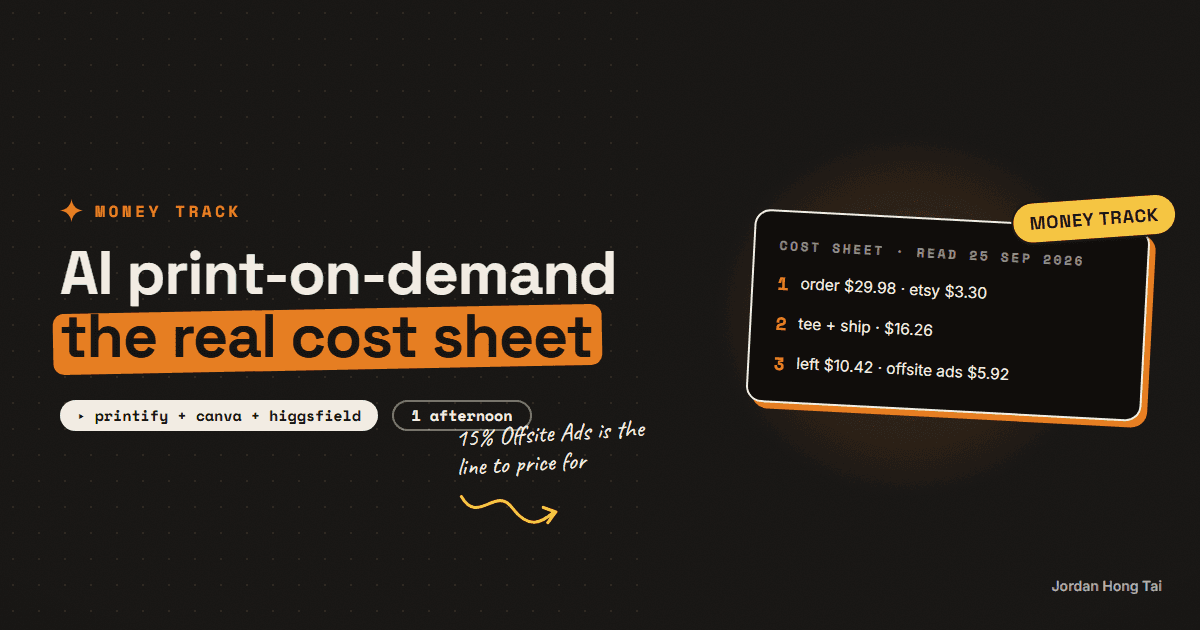
A $24.99 t-shirt on Etsy with $4.99 shipping brings in $29.98. Etsy's transaction fee, payment processing and listing fee take $3.30. The tee and its shipping from a Printify provider cost $16.26. About $10.42 is left, or $5.92 if the sale came through Etsy's Offsite Ads at 15%. The design and the mockup are cheap now. The fees stayed where they were, and Etsy requires you to say in the listing description that the item was made with AI.
A $24.99 t-shirt on Etsy with $4.99 shipping brings in $29.98. By the time Etsy and the print shop have been paid, about $10.42 of that is left. If the sale came through Etsy's Offsite Ads, about $5.92 is left.
That is the whole business, and I think it is the number almost nobody puts in the video. People do sell print-on-demand products with AI-made designs and AI-made mockups. The design is cheap now and so is the photo of it on a shirt. The fees stayed exactly where they were.
This guide is the cost sheet, line by line, from Etsy's own fee pages and a print provider's own catalog, read on 25 September 2026. Then it covers the rule most AI sellers skip: Etsy requires you to say, in the listing description, that the item was made with AI.
Results vary a lot. None of this is a forecast of what you or anyone will earn. It is what one sale costs.
What you'll have when you're done
- A per-item cost sheet you can fill in for any product before you list it
- A shop listing that follows Etsy's Creativity Standards for print-on-demand and for AI
- A design made with an image model and a mockup made in Canva or Photopea
- A trademark check you run before every design, not after the takedown notice
- A clear idea of how many sales a month it takes before a paid plan pays for itself
- [SCREENSHOT: the cost sheet filled in for one tee, with the Offsite Ads row switched on]
Before you start
- An Etsy shop. Listing a product costs $0.20. Etsy's fee policy says new shops may have to pay a one-time set-up fee and that it may be waived. Its Seller Handbook puts that fee at $15 for some new shops. Budget for it.
- A print-on-demand account. Printify or Printful. Both are free to join and both connect to Etsy. Printify names itself as an Etsy integration on its pricing page, and Etsy's own help article names Printful, Printify and Gooten as production partners.
- An image model. Midjourney's Basic plan is $10 a month. I make most of my images in Higgsfield, which runs several image models in one place, and it has a free tier.
- A mockup tool. Canva's Mockups app is free for up to 2,500 mockups. Canva Pro is $144 a year if you want the rest of Canva. Photopea is a free, ad-supported editor that opens PSD mockup templates.
- An afternoon for the first design, listing and test order.
Higgsfield: higgsfield.ai
Disclosure: the Higgsfield link on this page is an affiliate link. If you subscribe through it I earn a commission at no extra cost to you. I use Higgsfield on the builds in this guide; the workflow works the same on any plan, including the free tier.
Step 1: Do the cost sheet before the design
Most people design first and price last. Do it the other way round, because the price decides which products are even worth designing.
Here is one Bella+Canvas 3001 tee. It is the most common blank on both platforms. The buyer pays $24.99 plus $4.99 shipping, a US seller ships to a US buyer, and sales tax is left out.
| Line | Rate, and where it comes from | On a $29.98 order |
|---|---|---|
| Transaction fee | 6.5% of item price plus shipping (Etsy fees policy) | $1.95 |
| Payment processing | 3% + $0.25, US (Etsy Payments policy) | $1.15 |
| Listing fee | $0.20 per listing (Etsy fees policy) | $0.20 |
| Etsy total | $3.30 | |
| Tee, Monster Digital via Printify | $11.77 free plan, $9.40 on Premium | $11.77 |
| Shipping one tee in the US | $4.49 from that provider | $4.49 |
| Left over, free plan | $10.42 |
Printful lands almost in the same place. The same tee in black, S to L, is $11.25 in Printful's catalog, and its help centre gives $4.75 as the example for shipping one t-shirt to the USA. That leaves $10.68. A 2XL costs $13.75, which leaves $8.18, so check the sizes before you set one price for all of them.
Now the row that decides whether a shop works.
So a good month is not "sold 100 shirts". It is "sold 100 shirts and most of them came through search, not through Offsite Ads".
Cost sheet (one row per product and size)
item price:            ______
shipping charged:      ______
order total:           price + shipping
etsy transaction:      order total x 0.065
etsy processing:       order total x 0.03 + 0.25
listing fee:           0.20
pod base cost:         ______   (by provider, by size)
pod shipping:          ______
left over:             order total - all of the above
offsite ads version:   left over - order total x 0.15
Check it worked: fill the sheet for one product. If the Offsite Ads line is under $5, raise the price or pick a different blank before you design anything.
Step 2: Decide if a paid plan is worth it yet
Printify Premium takes the same tee from $11.77 to $9.40, which saves $2.37 a shirt. Premium is $39 a month, or $24.99 a month billed yearly.
At $24.99 you need about 11 tees a month before it pays for itself. At $39 you need about 17. Before your first sale, it is a cost with nothing behind it. Turn it on when the sales sheet says so.
The same goes for Midjourney and Canva Pro. You can build the first ten listings on free tiers.
Check it worked: write the break-even number next to each paid tool. If you are not at that number, the tool waits.
Step 3: Make the design
This is the part the AI made cheap. It is also the part everybody else can make just as cheaply, so spend your time on the idea and very little on the pixels.
Three rules I'd hold to. I learned the second one the expensive way, and I suspect most people do.
One niche you actually know. A niche is a group of buyers with a shared joke, job or hobby. "Funny shirts" is not a niche. "Shirts for night-shift ICU nurses" is.
Text-led designs print better than photo-style images. A detailed AI image with soft gradients often looks muddy on fabric. Bold shapes, few colours and clear type survive the printer.
Keep your prompts and your edits. You will need them for the disclosure in step 5, and they are your only record of what you actually made.
Design a print-ready t-shirt graphic.
Subject: [the joke or phrase, in the niche's own words]
Style: bold flat vector, 2 to 3 solid colours, thick outlines,
no gradients, no photo texture, no small detail under 2mm at print size.
Transparent background. Centered. No text other than: "[exact text]".
Do not reference any brand, character, logo, sports team or celebrity.
Check it worked: view the design at 10% zoom. If you cannot read it from across the room, it will not read on a chest either.
Step 4: Check it for trademarks before it goes near a shirt
This is the step that ends shops. Etsy's IP policy says it will remove material that is reported for alleged infringement, and that it terminates the selling privileges of members who get repeat or multiple notices.
Image models happily produce logos, characters and catchphrases that belong to someone. Phrases are the trap, because a short slogan can be a registered trademark for clothing.
- Search every phrase on your design in the USPTO's free trademark search at tmsearch.uspto.gov, and look for live marks in clothing or mugs.
- Never use a team, band, show, brand, character or famous person, even as a "parody".
- If the model drew something that looks like a known character, throw that design away. Do not edit it until it looks different.
Check it worked: every design in the shop has a line in your sheet saying "USPTO checked, [date], no live mark".
Step 5: Make the mockup, then write the listing Etsy's way
A mockup is a photo of a product with your design placed on it. Etsy's image rules say that for an original design a partner prints on a tee or mug, you may use a stock photo mockup. For personalised items, the first image cannot be a blank product or a placeholder mockup.
In Canva, open Mockups, pick a tee or mug, drop the design on and export. In Photopea, open a PSD mockup template, double-click the smart object, paste the design and save. Printify also offers AI mockups on its paid plan.
Then the listing. Two rules from Etsy's Creativity Standards decide what goes in it.
The item is "Designed by" you, with a production partner. Etsy's standards cover original designs produced or printed by a third party under "Designed by a seller". You must disclose that the item is made by a production partner, and set shipping to where the partner ships from.
Say it was made with AI. Etsy's exact rule: "Sellers must disclose within their listing description if an item is created with the use of AI." In the description, not in a tag and not in your shop's About page.
About this design
I designed this graphic using an AI image tool from my own prompts,
then edited and finished it myself. It is printed and shipped
by my production partner, [Printify / Printful], from [location].
Etsy also bans the sale of AI prompt bundles outright, so sell the shirt, not the prompt.
Check it worked: open your listing as a buyer. The AI sentence and the production partner are both visible without clicking into your policies.
Step 6: Order one yourself before you list ten
Buy one of your own shirts at the normal price. I figure it is the cheapest lesson in the whole guide. It costs you around $16 with shipping and it answers three questions no mockup can: is the print sharp, is the colour right, and how long did it take to arrive.
Then list, and track every sale in the cost sheet with one extra column: did it come from Offsite Ads or not.
Check it worked: you have held the real product in your hand and the listing photos match it.
The honest part about saturation
Etsy reported 5.7 million active sellers in its Q2 2026 filing with the SEC, against 87.0 million active buyers. Every one of those sellers has the same image models you do. The number of AI-made tees is growing faster than the number of people who want one.
What that means in practice:
- Your listing competes with thousands that look alike, so the niche and the words in the title carry most of the weight.
- Price is not a moat. Everyone has roughly the same $11 to $12 base cost.
- About $10 a shirt means volume. A hundred shirts a month in a good month is about $1,000 left over before Offsite Ads, tools, test orders and returns. Plenty of shops sell a handful. Some sell none.
So I think the math works in one situation. You know a niche well enough to write the joke nobody else is writing, you keep your prices above the Offsite Ads line, and you treat each design as a small bet with a known cost.
What I'd do differently
Price for the Offsite Ads version. I know it feels pessimistic. If the shirt only works without the 15%, it only works in the months when Etsy decides not to advertise it.
Five designs in one niche beat fifty across ten. A buyer who likes one shirt looks at the rest of the shop, and a shop with one theme gives them something to look at.
Keep the prompt log from day one. It is your disclosure record, your trademark trail and the only way to remember which idea actually sold.
Check every size's base cost. The 2XL costs more to make, and a flat price quietly loses money on the biggest sizes.
FAQ
How much is left from one print-on-demand t-shirt sale on Etsy?
On a $24.99 tee with $4.99 shipping, the buyer pays $29.98. Etsy takes 6.5% transaction ($1.95), 3% plus $0.25 payment processing ($1.15) and the $0.20 listing fee, $3.30 in total. A Bella+Canvas 3001 from Monster Digital on Printify's free plan is $11.77 plus $4.49 shipping. That leaves about $10.42. If the sale came through Etsy's Offsite Ads, another 15% ($4.50) comes off and about $5.92 is left. Prices read 25 September 2026; results vary.
Do I have to tell buyers my design was made with AI?
Yes. Etsy's Creativity Standards say sellers must disclose within their listing description if an item is created with the use of AI. That means the description itself, not only a tag or your shop's About page. Etsy also prohibits selling AI prompt bundles.
Is print-on-demand allowed on Etsy?
Yes, as long as the design is yours. Etsy classes a seller's original design produced or printed by a third party as Designed by a seller, and its help centre names Printful, Printify and Gooten as production partners. You must disclose the production partner and set shipping to where the partner ships from. I found no 2025 or 2026 Etsy policy banning print-on-demand on Etsy's own pages.
Is Printify Premium worth it?
Only once you are selling. Premium cuts the Monster Digital tee from $11.77 to $9.40, which saves $2.37 a shirt. It costs $39 a month, or $24.99 a month billed yearly, so you need about 11 to 17 tees a month before it pays for itself.
Can someone copy my AI design?
Probably, and there may be little you can do. The US Copyright Office's January 2025 report says AI output is protected only where a human author has determined sufficient expressive elements, and that prompts alone are not enough. Treat the niche, the listing and the shop as your edge rather than the file.
What gets a print-on-demand shop shut down?
Trademarks and copyrighted characters, most often. Etsy's IP policy says it removes reported material and terminates the selling privileges of members with repeat or multiple notices. Search every phrase in the free USPTO trademark search at tmsearch.uspto.gov before it goes on a product, and never use teams, brands, characters or famous people.
Related guides
On-brand AI images every time: the reference trick nobody uses
You'll stop describing your brand to AI and start handing it references. Ten minutes of setup, and your generated images come back in your palette every run.
Turn a Claude skill into a $49 digital product
There are two markets for this and they are not the same market. On PromptBase, a Claude skill is a $5 to $10 item: across 52 priced listings on its Claude Skills page the band ran $3.99 to $19.99 with a median of $7.99. On Gumroad, listings in the same category run into the tens and hundreds of dollars, and $49 is a price people actually charge. Same file format, eight times the price, and the difference is packaging and traffic. This guide is how to build the version that belongs in the second market.
AI UGC ads for small brands: how people land the first paid client with no audience
Small brands buy ads that look like a person talking, and they buy them by the batch because most of them fail. The people getting paid for this now are not creators with an audience. They are operators with HeyGen, a voice from ElevenLabs, and three sample ads made for a brand that never asked for them. This guide is that whole loop: the script structure, the production, the spec reel, the outreach message, and what the work is priced at.
Get the next build in your inbox
One email a week: the newest guides, plus one thing I only share with the list.
No spam. Unsubscribe anytime.
Build alongside others
Join the free community and share what you're shipping.

Jordan Hong Tai
I've scaled products to over 500K users, and now I build AI systems in public from a balcony in Tokyo.