Podcast clipping with AI: Opus Clip vs HeyGen AI clipping, the per-clip cost and what clippers charge
Last updated October 2026 · An afternoon for the first episode, ten clips and the pitch · Opus Clip Free (watermark) to $29/mo; HeyGen API $0.69 a minute; Fiverr and Upwork free to list · Beginner
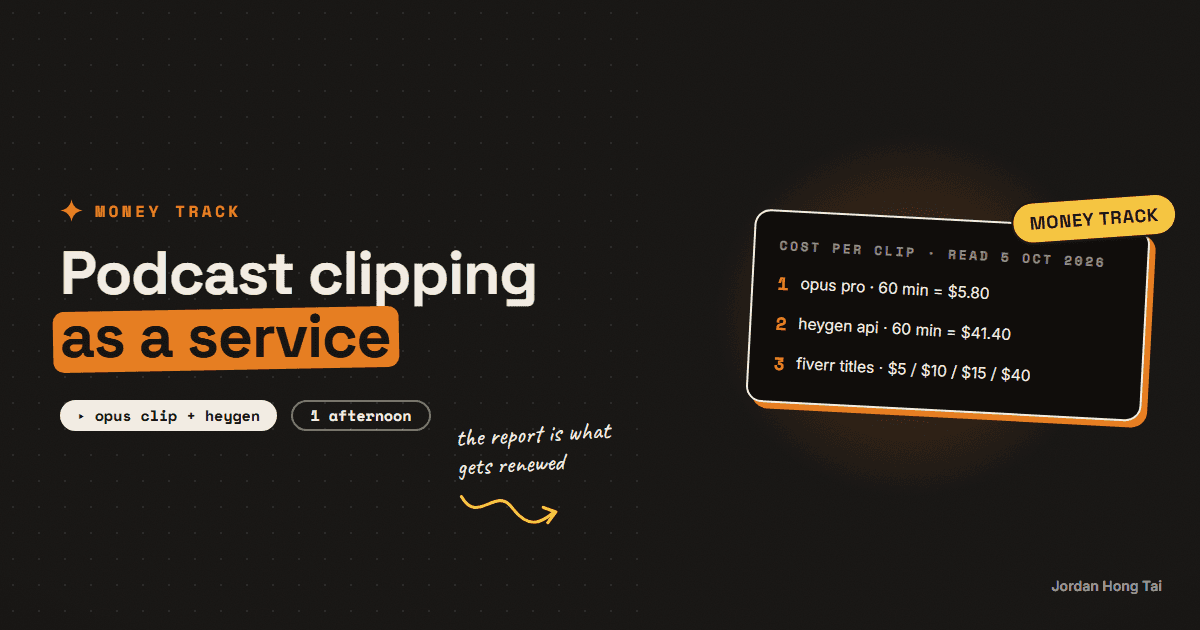
A 60-minute podcast episode costs 60 credits to clip on Opus Clip, which is about $5.80 of the $29 Pro plan. If it yields ten usable clips, the tool cost is about 58 cents a clip. Fiverr clippers list the same clip at $5, $10 and $15. The gap is not the AI picking the moments. It is somebody rewriting the hook, fixing the captions, naming the clips and sending the podcaster a report that says which ones worked.
A 60-minute podcast episode costs 60 credits to clip on Opus Clip, which is about $5.80 of the $29 Pro plan. If it yields ten usable clips, the tool cost is about 58 cents a clip. Fiverr clippers list the same clip at $5, $10 and $15.
The gap is not the AI picking the moments. The AI is fine at picking moments, and it is getting better every quarter. The gap is somebody rewriting the hook on the first line, fixing the captions where the model misheard a name, titling the clips so the podcaster can find them, and sending a report at the end of the month that says which three clips got the views.
This guide is the cost sheet for the two tools, from their own pricing pages read on 5 October 2026, the asking prices from the marketplaces the same day, and then the pass that earns the fee and the pricing model that gets a renewal.
Results vary a lot. None of this is a forecast of what you or anyone will earn. It is what a clip costs and what people ask for one.
What you'll have when you're done
- A per-clip cost sheet for Opus Clip and HeyGen AI Clipping that you can fill in for any episode length
- Ten clips from one episode, each with a rewritten hook and checked captions
- A pitch to a podcaster that quotes their own episode
- A monthly pricing model with a report template behind it
- A clear line on when the free plan stops being enough
- [SCREENSHOT: Opus Clip's clip list for one episode with the virality scores showing, next to the cost sheet]
Before you start
- An Opus Clip account. Free is 60 credits a month with a watermark, no editing, and clips that stop being exportable after three days. Starter is $15 a month, monthly billing only, for 150 credits, and it removes the watermark and adds the editor and the virality score. Pro is $29 a month, or $14.50 a month billed yearly at $174, for 300 credits that roll over for two months, with a two-seat workspace, a scheduler, brand vocabulary and custom clip lengths. One credit is one minute of source video.
- Or HeyGen's API, pay as you go, no plan, at $0.69 per minute of input for AI Clipping. More on when that makes sense in step 1.
- One podcast episode you have permission to clip. Your own, or a friend's, 45 to 60 minutes, video not audio.
- A Fiverr or Upwork profile, free to list.
- An afternoon.
Opus Clip: opus.pro HeyGen: heygen.com
Step 1: Do the cost sheet before the pitch
Opus Clip charges by the minute of video you import, not by the clip. Its help centre says processing costs 1 credit per minute of the original video, videos under a minute round up to one credit, and partial minutes round down, so a 4.5-minute video is charged as 4. You can also drag the processing timeframe to clip only part of an episode and pay only for that part.
| Plan | Price | Credits a month | Cost per credit-minute | A 60-minute episode | Ten clips from it |
|---|---|---|---|---|---|
| Free | $0 | 60 | $0 (watermark, 3-day export) | all of the month | $0 |
| Starter | $15, monthly only | 150 | $0.10 | $6.00 | $0.60 a clip |
| Pro, monthly | $29 | 300 | about $0.097 | about $5.80 | about $0.58 a clip |
| Pro, yearly | $14.50 a month ($174) | 300 | about $0.048 | about $2.90 | about $0.29 a clip |
Two Opus details that touch the sheet. Posting a clip to X from inside Opus costs 3 credits per clip per X account, so do not schedule to X from the tool unless the client asked. And on Pro you can buy more credits in packs, which the pricing page lists as 1 to 15 packs, so a client with four episodes a week does not break the model.
HeyGen prices the same job differently. Its API pricing page, last updated 16 September 2026, lists AI Clipping, Highlight Clip, at $0.69 per 1 minute of input video, 14 credits a minute. A 60-minute episode is $41.40, and ten clips is $4.14 a clip. For that you get, from its developer docs, clips at 30 seconds, 60 seconds, 180 seconds or long, each with an auto title, a thumbnail and a virality score from 0 to 100, captions on by default in a classic or bold style, reframing to 9:16, 16:9 or 1:1, and an optional prompt of up to 500 characters telling it which speaker or topic to favour.
So HeyGen's clipper is about seven times the price per episode on Opus Pro monthly. I'd use it when the job has to run from code without anyone opening an app, which is a different business from the one in this guide.
Cost sheet (one row per episode)
source minutes:          ______
tool:                    opus starter / opus pro / heygen api
cost per minute:         0.10 / 0.097 / 0.69
tool cost:               minutes x cost per minute
clips kept:              ______  (after step 3, not before)
tool cost per clip:      tool cost / clips kept
your time per clip:      ______ minutes  (hook, captions, title)
price for the month:     ______
Check it worked: fill the sheet for your test episode. If you cannot say what one clip costs you in tool money and in minutes, you are not ready to quote.
Step 2: Read what the market asks, with the date on it
Asking prices are not earnings. Here is what I could read on 5 October 2026.
Fiverr. Fiverr blocked my browser with a human check when I tried to open the gig pages, so what I have is the starting price Fiverr itself puts in each gig's title. Six indexed titles for editing a podcast into short-form clips read $5, $5, $10, $15, $15 and $40. The $40 one offered repurposed clips with captions in 24 hours. I cannot tell you what each package includes.
Upwork. Upwork's own cost page says video editors typically cost $6 to $25 an hour, with an entry tier median of $10 an hour, a mid tier of $31 to $60 with a median of $40, and a senior tier from $61. It names the podcast video editor as a role that turns long recordings into episodes and "may also create short clips for social media from each episode".
Whop. Whop's Content Rewards is the other model. A brand sets how much clippers earn per 1,000 views, with a minimum payout before a clip reaches review and a maximum payout per clip, and Whop pays automatically after the brand approves the submission. The docs do not state a platform fee. One live campaign I opened on 5 October paid $1 per 1,000 views on YouTube Shorts, Instagram Reels and TikTok. That is a bounty, not a client. You carry the view risk.
What I take from the three together: the per-clip entry price on Fiverr is $5 to $15, the hourly rate on Upwork puts a ten-clip pass at roughly $10 to $40 of editor time at the low end, and the bounty model pays nothing until the clip performs. The tool cost under all three is under a dollar a clip.
Check it worked: write the six Fiverr prices and the Upwork range in the sheet with today's date. Re-read them in a month.
Step 3: The hooks-and-captions pass
This is the service. Opus Clip picks candidates and scores them. HeyGen does the same and hands back a 0 to 100 number. Neither tool knows that the podcaster's audience is small business owners who will not watch past a vague first line.
Take the top fifteen candidates by score and do this to each one you keep:
- Rewrite the first line. The clip's first two seconds should be the most specific sentence in it, moved to the front. Most AI clips open on the setup. Open on the claim or the number.
- Fix the captions. Names, product names and numbers are where the transcript breaks. Read every caption once. On Opus Pro, add the podcaster's names to brand vocabulary so they stop breaking.
- Cut the ending. The clip should end on the payoff sentence, not on the host saying "yeah". Most AI clips run two seconds long.
- Title it for the client, not the platform. "Ep 41, 14:20, the pricing mistake" is a title the podcaster can find in a folder. Write the platform caption separately.
- Keep ten, bin five. A client who gets fifteen mediocre clips posts three. A client who gets ten good ones posts ten.
Clip sheet (one row per kept clip)
episode / timestamp:   Ep __ / __:__
hook (first line):     ______  (rewritten, under 12 words)
captions checked:      yes / names fixed: ______
length:                __s  (ends on the payoff)
file name:             ep41_1420_pricing-mistake.mp4
caption for platform:  ______
Check it worked: play the first three seconds of each kept clip with the sound off. If the caption on screen is a specific claim, the hook is done. If it is a name and a "so", it is not.
Step 4: Pitch the podcaster with their own episode
Do not pitch with a deck. Clip their last episode on the free plan, which costs you nothing for an hour of video, and send three clips with the hook rewritten. The pitch is the work.
Subject: three clips from episode [N]

Hi [name], I clipped your latest episode into shorts and these three
are the ones I'd post first. The first line of each is rewritten from
the raw cut, and the captions are checked against the names in the
show notes.

[three links]

I do this as a monthly service: every episode clipped within 48 hours,
ten finished clips with hooks and captions, and a report at month end
showing which clips got the views so the next month gets better. If
you'd like the numbers, I'll send them.

Jordan
The free plan has a watermark and clips expire from the tool after three days, so download them the day you make them. It is fine for a pitch. It is not fine for delivery.
Check it worked: the podcaster can watch all three clips without reading a word of your email. If they need the email to understand the clips, redo the hooks.
Step 5: Price for the month, not the clip
Here is where I'd push against the marketplace. Fiverr prices per clip because the platform is built for one-off orders. Your client is not buying one clip. They are buying the next twelve months of their show appearing on three feeds.
So I'd price a month: a set number of episodes, ten clips each, delivered within 48 hours, with a report. Quote the per-clip number only so the client can see the maths. On Opus Pro the tool cost of four episodes a month is about $23 of the $29 plan, so the plan is paid for by one client and the rest is your time.
Two pricing models, and the one I'd pick:
- Per clip. Easy to compare, easy to start, and every month becomes a conversation about which clips counted. Rewards quantity when the client wants views.
- Monthly. One number, a defined scope, and the report attached. Harder to sell the first time, far easier to renew.
I'd pick monthly, with the first month at a lower rate on the condition that the report goes out at the end of it.
Check it worked: your offer page says how many episodes, how many clips, how fast, and what the report contains. If it only says a price, it is a per-clip offer with a monthly name.
Step 6: The report is what gets renewed
A client renews because they can see the clips working, not because the clips exist. So the last deliverable of every month is a one-page report:
- Clips delivered, with links
- Views per clip after seven days, from the client's own platform analytics or yours if you post for them
- The top three clips and what their first lines had in common
- The one change for next month, in one sentence
Opus Pro's clip analytics can give you some of this inside the tool for clips posted through it. The podcaster's own YouTube Studio and Instagram insights give you the rest, and they will usually hand you access once the first month has gone well.
Check it worked: the report fits on one page and the first thing on it is the best clip's view count. If it opens with a list of files, rewrite it.
The honest part about this market
A 60-minute episode costs under six dollars to clip. That number is public, the clients know it or soon will, and it is falling. So the clip itself is not something anyone can charge much for.
What people are paying for, when they pay, is the first line, the fixed captions, the folder of files they can find, and the report. I'd say that is a real service, and I'd also say it takes two hours an episode done properly, which is why $5 a clip only works for people who skip it.
Whop's bounties sit outside all this. You are not serving a client, you are betting your two hours against a $1 per 1,000 views rate and a payout cap. Some people do well at it. Most clips do not get a thousand views. Price your own time before you take the bet.
What I'd do differently
Pitch with their own episode, on the free plan. It costs nothing and it is a better pitch than any deck.
Go Pro yearly once the first client signs. $14.50 a month halves the tool cost per clip and the credits roll over two months.
Charge monthly from the first client. It is a harder first conversation and an easier twelfth one.
Send the report before they ask. It is the only deliverable that makes month two feel inevitable.
FAQ
How much does Opus Clip cost per clip?
Opus Clip charges 1 credit per minute of the source video you import, not per clip, with videos under a minute rounded up and partial minutes rounded down. On the Pro plan at $29 a month for 300 credits, a 60-minute episode is 60 credits, about $5.80. If that episode gives you ten clips you keep, the tool cost is about 58 cents a clip. Starter is $15 a month for 150 credits, monthly billing only. Free is 60 credits a month with a watermark and clips that stop being exportable after three days. Prices read 5 October 2026.
What does HeyGen AI Clipping cost?
HeyGen's API pricing page, last updated 16 September 2026, lists AI Clipping Highlight Clip at $0.69 per minute of input video, 14 credits a minute. A 60-minute episode is $41.40. The API takes a video URL or asset, lets you ask for 30-second, 60-second, 180-second or long clips, returns each with an auto title, thumbnail and a virality score from 0 to 100, and can caption and reframe to 9:16, 16:9 or 1:1. You can also add a prompt of up to 500 characters telling it which speaker or topic to favour.
What do clippers charge?
Fiverr gig titles indexed on 5 October 2026 for podcast-to-short-form editing read $5, $5, $10, $15, $15 and $40. Fiverr blocked my browser from opening the gig pages themselves, so those are the starting prices in the titles, not what the packages include. Upwork's own cost page puts video editors at $6 to $25 an hour, with an entry median of $10 an hour and a mid tier median of $40. Whop's Content Rewards campaigns pay clippers per 1,000 views at a rate the brand sets; one live listing I opened paid $1 per 1,000 views on YouTube Shorts, Instagram Reels and TikTok.
Should I charge per clip or a monthly fee?
Charge monthly for a fixed number of episodes and clips, and quote the per-clip number only to show the maths. Per-clip pricing turns every month into a negotiation about which clips counted and rewards you for quantity when the client wants views. A monthly fee with a report of views per clip is what gets renewed, because the client sees the clips as a programme rather than a pile of files.
Is Opus Clip's virality score worth anything?
It is a ranking, not a prediction. Opus Clip includes it on Starter and Pro but not Free, and HeyGen's API returns one from 0 to 100 on every clip. Use it to order the candidates, then watch the top fifteen yourself. The hook rewrite in step 3 does more for a clip than any score, and your own view data after a month will tell you more about this podcaster's audience than either tool can.
Does the podcaster need to disclose AI editing?
Usually not for a cut and captions. YouTube's disclosure rule covers realistic altered content that makes a real person appear to say or do something they did not, alters footage of a real event, or generates a realistic scene that never happened; trimming, captioning and reframing a real recording is not that, and YouTube lists minor edits as not needing the label. If you use AI B-roll, a synthetic voice-over or a dub, which Opus Clip's Pro plan offers, then yes, and the line in my AI video dubbing guide covers it.
Related guides
One-person content agency: 30 short videos a week, the real cost sheet
Seven avatar reels cost me $14.71 last week. That is the whole render bill, measured, not estimated. This guide takes the per-unit costs from a pipeline that actually runs every week and does the arithmetic for 30 short videos a week: what HeyGen bills per finished second, what ElevenLabs charges per character, what local editing costs, and what the whole month comes to per finished video. Then it puts that next to what agencies and freelancers publicly charge for short-form retainers, so you can see the gap the business lives in.
I made Claude Code my video editor (cuts, captions, exports)
You'll give Claude Code a skill file that edits your videos: transcribe, cut the dead air, burn captions, export 9:16. After the 30-minute setup, editing a clip is one sentence in a terminal.
AI video dubbing as a service: HeyGen video translate, what it costs per minute, and what Fiverr sellers charge
A minute of AI-dubbed video with lip sync costs about 29 cents in HeyGen credits on its $29 Creator plan. The Fiverr listings for the same service start at $10, $15 and $20, and one lip-sync gig starts at $120. That gap is the whole business, and it exists because the client is not paying for the render. They are paying for someone to check the brand names, fix the one line the model got wrong, deliver the files in the right shape and tell them honestly that a synthetic voice was used.
Get the next build in your inbox
One email a week: the newest guides, plus one thing I only share with the list.
No spam. Unsubscribe anytime.
Build alongside others
Join the free community and share what you're shipping.

Jordan Hong Tai
I've scaled products to over 500K users, and now I build AI systems in public from a balcony in Tokyo.