A solo developer in South Korea made his first game, Slotbound, and put it on Steam on 12 November 2026. His own Steamworks dashboard says it grossed $1,332,409 in the first week. He told the Korean outlet Inven that AI wrote "virtually almost all of the code."
But the AI isn't why it sold, and the launch nearly went wrong anyway. His first Steam build review took 13 days, then it was rejected, and he missed his own launch date.
This is the free kit from my video on Slotbound. If you commented STEAM, this is what I promised you: the full Steam launch checklist with every date and wait time, the rules file template I gave Claude, and the prompts I use for bug reports. There's also an honest section on the odds, because most Steam games don't end up anywhere near this one.
One thing to be clear about before we start. Slotbound's developer used GitHub Copilot and then OpenAI Codex. He never used Claude. Everything below that mentions Claude Code and Godot is my setup, from a small prototype I built to test the workflow. It's not his.
What you'll have when you're done
- A printable Steam launch checklist, with the fee, the waits and the review times in the order they hit you
- A countdown from launch day backwards, plus real dates if you're aiming at the February 2027 Next Fest
- A rules file you can fill in for your own game and hand to Claude Code on day one
- A headless test file pattern, and a screenshot check that catches the bugs your tests miss
- Five prompts for Claude Code: the bug report, the fix, a new feature with tests, the screenshot check and a pre-review check of your store page
- The real numbers on how most Steam games do, so you can plan without fooling yourself
Before you start
- A Steamworks account. Steam charges $100 per game. You can't get it refunded, but you get it back in a later payout once the game makes $1,000 in adjusted gross revenue.
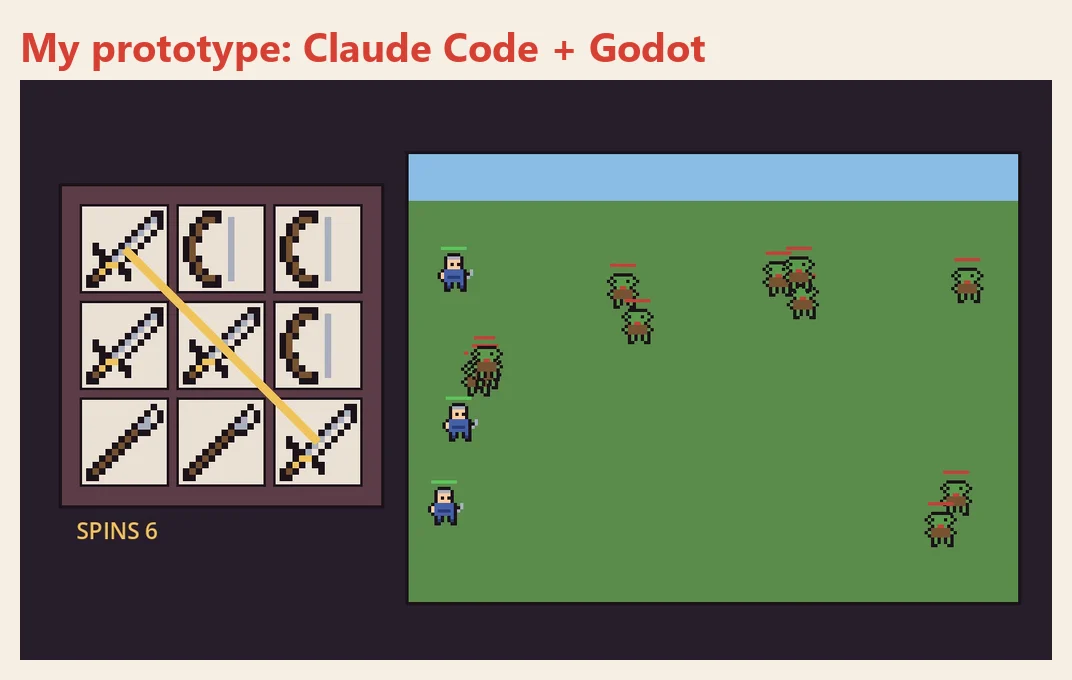
- An engine the AI can read. Slotbound is made in LÖVE, which is just Lua code files. I used Godot 4, because its scripts and scenes are text too, so Claude Code can see the whole game and change any part of it. Engines that live in a big visual editor are harder, because the agent can't click around in there. That last part is my opinion, not a sourced fact.
- Claude Code, or another coding agent that can run commands. The rules file and the prompts work with any of them.
- About 2 hours to set up the rules file, the tests and the screenshot check. The checklist itself runs for months, so print it.
All of the Steam rules below were read from Valve's Steamworks docs on 27 November 2026. Valve changes these, so check the linked doc before you lean on a date.
Part 1: What actually made Slotbound work
I'll keep this short, because I think the checklist is the useful part. But the story tells you where the effort went, and it wasn't the code.
| When | What happened |
|---|---|
| 17 Oct 2025 | He starts, with no game dev experience, living on savings |
| 10 Jul 2026 | A free demo goes up on Steam, about 8 months in. It climbs to #2 on Steam's demo chart |
| 27 Jul 2026 | 50,000 wishlists |
| 27 Sep 2026 | Over 100,000 wishlists. He announces an Early Access launch for 10 November |
| 18 Oct 2026 | He submits the build for review. It takes 13 days, then it's rejected |
| 10 Nov 2026 | Launch day is missed, because the second review is still pending |
| 12 Nov 2026 | Slotbound comes out as a full 1.0 release at $9.99 |
| First week | Over 200,000 copies and $1,332,409 gross, by his own numbers |
What I'd take from that:
One hook you can say in a sentence. He saw a slot-machine roguelike called CloverPit and asked what would happen if three spears in a row summoned spearmen. You spin a 3x3 slot machine, and the lines you hit become your army. He didn't invent a genre.
A demo months before launch. The demo went out four months early, YouTubers played it, and he put out about 15 public versions of it. When someone asked him what drove the launch, his answer was that maybe the demo got a lot of attention. He also said, in his own words to Inven, that "promotion played almost no role" in his view. He did still email YouTubers and post about it, so I wouldn't read that as no marketing.
Thirteen months of finishing it. AI wrote the code, but he directed it, tested it and balanced it. Most of the character art came from bought asset packs, AI made some backgrounds and effects, and most of the music was volunteered by someone on Reddit. He pushed more than ten fixes in launch week alone.
And his most useful line for anyone building with AI: what he had to master "wasn't coding syntax", it was how to explain problems accurately. The prompts in Part 4 are built around that.
He also used the same three habits this kit is built on. According to indietooling.com, he had a rules file for the AI, automated tests after each fix and a screenshot tool for checking the layout.
Part 2: The Steam launch checklist
The fixed waits
These are the timelines you can't speed up, so I'd put them on a calendar first.
| Step | How long | Where it comes from |
|---|---|---|
| Tax check | can take up to 30 days | Steamworks onboarding doc |
| Wait after paying the $100 fee, before you can release | 21 days, for your first few games | Steamworks onboarding doc |
| Store page review | submit at least 7 business days before you want it live | Steamworks review process doc |
| Coming Soon page public | at least 2 weeks before launch | Steamworks onboarding doc |
| Build review | Valve's onboarding doc says 1 to 5 days | Slotbound's first one took 13 days and was rejected |
That last row is the one that cost Slotbound its launch date. He submitted more than three weeks before launch, and it still wasn't enough. So my rule is to have a launch-ready build in review at least a month before your date, and more if you can.
The countdown from launch day
L is launch day. The dates in the left column are the latest I'd leave each step. Earlier is always fine.
| When | What to do |
|---|---|
| As early as you can, months before L | Start Steamworks onboarding and pay the $100 fee |
| L minus 4 months or more | Store page up as Coming Soon, so wishlists start counting. Slotbound's demo went out 4 months before launch |
| L minus 6 weeks | Store page text, capsule art, screenshots and trailer final. Every claim on the page works in the build |
| L minus 5 weeks | Fresh-install test on a clean machine. Then submit the build for review |
| L minus 2 weeks | The last day your Coming Soon page can go public. Don't wait this long |
| L | Launch. Your launch discount can be up to 40%, and it runs 7 to 14 days |
| L to L plus 14 days | The refund window. Players can refund within 14 days if they've played under 2 hours |
| After the launch discount ends | No new discount for 30 days, apart from Steam's seasonal sales |
| Once you pass $1,000 | The $100 fee comes back in a later payout |
If you're starting this week
Today is 27 November 2026. The next Steam Next Fest is the one I'd aim a demo at.
| Date | What |
|---|---|
| This week | Start onboarding and pay the fee. The tax check alone can take until late December |
| 10 Jan 2027 | Next Fest registration closes |
| 8 Feb 2027 | Next Fest submissions are due |
| 22 Feb to 1 Mar 2027 | Steam Next Fest runs. The one after that is 14 to 21 June 2027 |
I'd read Steam's own Next Fest page for the full requirements before you register. And I'd count Slotbound's Next Fest history as unknown. I couldn't confirm it was ever in one, and its 100,000 wishlists came without a confirmed Next Fest.
The printable checklist
Copy this into a doc and print it. Tick things off as you go.
STEAMWORKS ONBOARDING (start first, it's slow)
[ ] Sign the NDA and the Steam Distribution Agreement
[ ] Pay the $100 app fee (starts the 21-day wait for first games)
[ ] Bank details, with the account name matching your legal name
[ ] Tax questionnaire (verification can take up to 30 days)
[ ] Identity verification

STORE PAGE
[ ] One-line hook a stranger gets in five seconds, at the top
[ ] Capsule art, screenshots and trailer from the real build
[ ] No prices written in the description
[ ] Every feature, language, cloud save and achievement listed
    actually works in the build
[ ] AI content survey filled in (see Part 5)
[ ] Submitted for review at least 7 business days before it goes live
[ ] Public as Coming Soon at least 2 weeks before launch
    (I'd aim for months)

DEMO
[ ] No in-app purchases in the demo
[ ] Out months before launch, and patched in public
[ ] Next Fest registration by 10 Jan 2027, submission by 8 Feb 2027
    (if you're aiming at the February 2027 fest)

BUILD REVIEW
[ ] Fresh install on a clean machine: the Play button launches it
[ ] No crashes, no debug build, redistributables included
[ ] Steamworks changes published, build set live on the default branch
[ ] Screenshots on the store page match the game
[ ] Submitted at least a month before launch day

LAUNCH
[ ] Launch discount set (40% max, 7 to 14 days)
[ ] First two hours of play are the best two hours (refunds: 14 days, <2h)
[ ] Patch plan for launch week
[ ] Calendar note: no new discount for 30 days after this one ends
The build review rows come from Valve's own list of common rejection reasons. Crashes, missing redistributables and debug builds are on it. So are Steamworks changes that weren't published, a build that isn't live on the default branch, store claims the build doesn't support, prices in the description and in-app purchases in a demo.
The money, so you know what "gross" means
Valve takes 30% of revenue up to $10 million, 25% above that and 20% above $50 million. Those tiers were reported when Valve introduced them in 2018, and I couldn't read the current agreement text myself, so treat them as the reported rule. Refunds and sales tax come out too, before you're paid.
This is how that worked out for Slotbound, from the dashboard he posted:
Slotbound, first week, his own Steamworks numbers
  Gross revenue                          = $1,332,409
  After refunds and sales tax            = about $1.18 million
  After Valve's 30%                      = about $826,000
  Still to come out                      = his income tax
Honestly, that's still life-changing money. But the headline number is the gross, and the money he keeps is a lot less.
Part 3: The rules file and the checks
Why a rules file
A coding agent starts every session knowing nothing about your game. The rules file is a short document at the top of the project that says what the game is, where each kind of code lives, what it must never do and what "done" means. You tell Claude Code to read it before every change. Without it, AI code tends to slowly fall apart: rules end up in the drawing code, randomness can't be repeated, and fixes get marked done because they compile.
This is the template, adapted from the real RULES.md in my prototype. Fill in the brackets.
# RULES.md: read this before every change

## What the game is
[Two or three sentences a stranger would understand. What the player
does, what happens on screen, how you win or lose.]

[The main pieces, one line each, e.g.
Symbols: SWORD (swordsman, melee), SPEAR (spearman, longer reach),
BOW (archer, ranged).]

## How the code is organized
- `[logic file]`: pure game rules. No drawing, no nodes, no input.
  Everything in here must be testable headless.
- `[second logic file]`: [e.g. unit stats and one combat tick]. Also pure.
- `[art file]`: [where the art lives and its fixed format]
- `[main file]`: the only file that draws or reads input. It calls the
  others.
- `[test file]`: the tests. Run them after EVERY change:
  `[exact test command]`

## Never
- Never put game rules in `[main file]`. Logic lives in the logic files.
- Never use randomness without a seed. Anything random takes an RNG so
  tests can repeat it.
- Never change [a fixed size or format, e.g. "a sprite's size. Every
  sprite is 12x12"].
- Never mark a fix done until the tests pass AND the screenshot check
  passes.

## After every fix
1. Run the tests.
2. Render a screenshot: `[exact screenshot command]`
3. Check it: [what must be visible and where, e.g. "the reel grid is
   fully on screen on the left, the field on the right, nothing overlaps
   the reels, and at least one unit is visible after a spin"].

## Bug reports look like this
- What I did:
- What I expected:
- What happened:
I think the split in "How the code is organized" is the part to copy exactly. If the game rules live in files that don't draw anything, the agent can test them with no window open, and that's what makes the tests fast enough to run after every change.
The tests
My prototype has seven headless tests. Each one sets up a tiny situation and checks one rule. This is part of the real file, in GDScript:
extends SceneTree
## Headless tests. Run after every change:
##   godot --headless --path . --script tests/run_tests.gd

var failed := 0


func check(name: String, ok: bool) -> void:
	print(("PASS " if ok else "FAIL ") + name)
	if not ok:
		failed += 1


func _init() -> void:
	# a full row of spears summons three spearmen
	var g := [["SPEAR", "BOW", "SWORD"], ["SPEAR", "SWORD", "BOW"], ["SPEAR", "BOW", "BOW"]]
	check("row of spears is one match", Slots.matches(g).size() == 1)
	check("row of spears summons 3 spearmen", Slots.summons(g).get("SPEAR", 0) == 3)
	# same seed, same spin (spins must be repeatable)
	var a := RandomNumberGenerator.new(); a.seed = 42
	var b := RandomNumberGenerator.new(); b.seed = 42
	check("seeded spins repeat", Slots.spin(a) == Slots.spin(b))
	# an archer shoots from range instead of walking into melee
	var units := [Battle.make_unit("BOW", Vector2(0, 0), 0), Battle.make_unit("GOBLIN", Vector2(100, 0), 1)]
	units = Battle.tick(units, 0.1)
	check("archer hits from range", units[1].hp < Battle.STATS.GOBLIN.hp and units[0].pos.x == 0.0)
	print("%d failed" % failed)
	quit(1 if failed else 0)
It exits with 1 if anything fails, so Claude Code can tell from the exit code alone. The "seeded spins repeat" test is the one that keeps the "never use randomness without a seed" rule honest.
The screenshot check
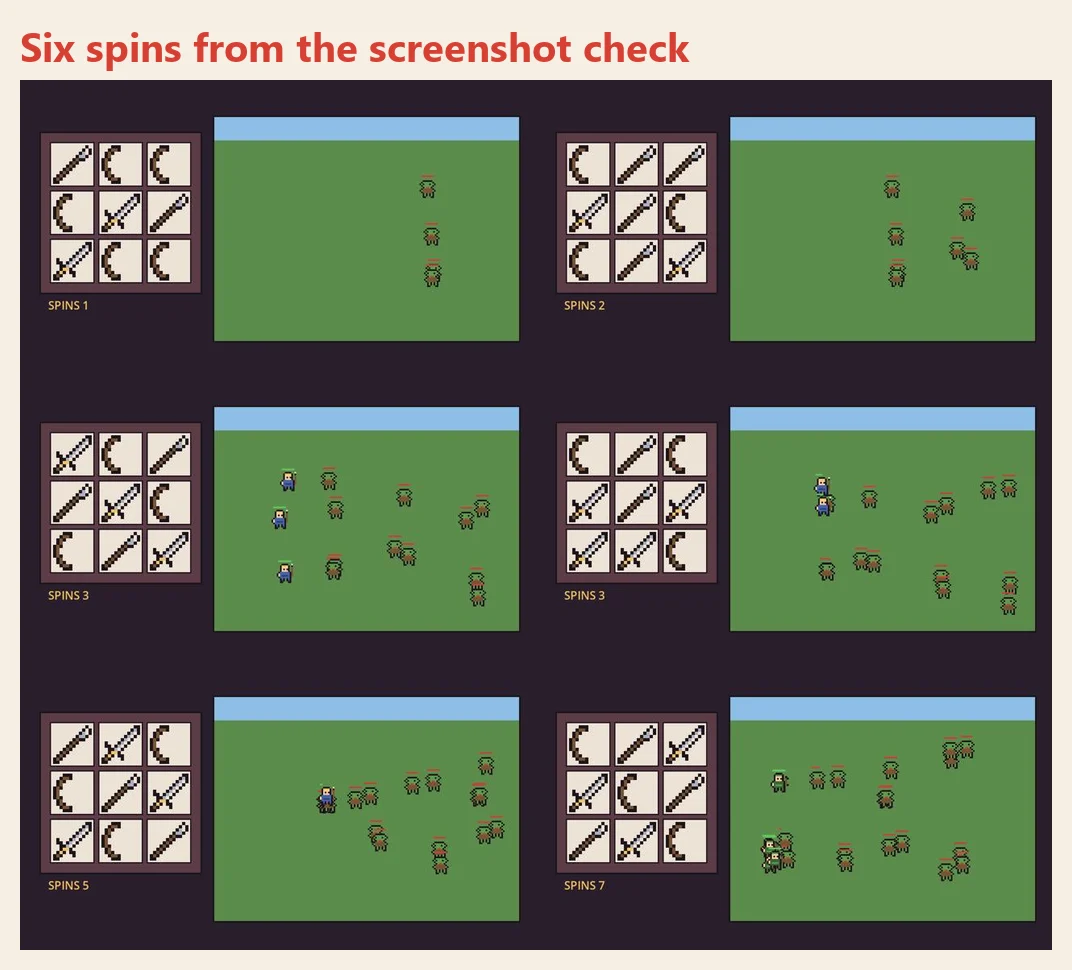
Tests only check what you wrote tests for. In my prototype they checked the slot logic and the combat, and they never loaded the drawing code at all. So the rules file has a second step: render a few seconds of the real game to an image and look at it.
# run the tests
godot --headless --path . --script tests/run_tests.gd

# render 90 frames of the real game to PNG files in shots/
godot --path . --write-movie shots/check.png --fixed-fps 30 --quit-after 90
--write-movie with a .png name writes numbered frames, and --fixed-fps 30 --quit-after 90 makes it render 3 seconds of game time and stop. Claude Code can open the images and compare them with step 3 of the rules file.
Check it worked: you can run your test command and see a PASS or FAIL line per test, and the screenshot command leaves image files in shots/.
The bug it caught
This is a real entry from my bug log, the day I built the prototype. All seven tests passed. Then the screenshot check came back as a flat grey screen.
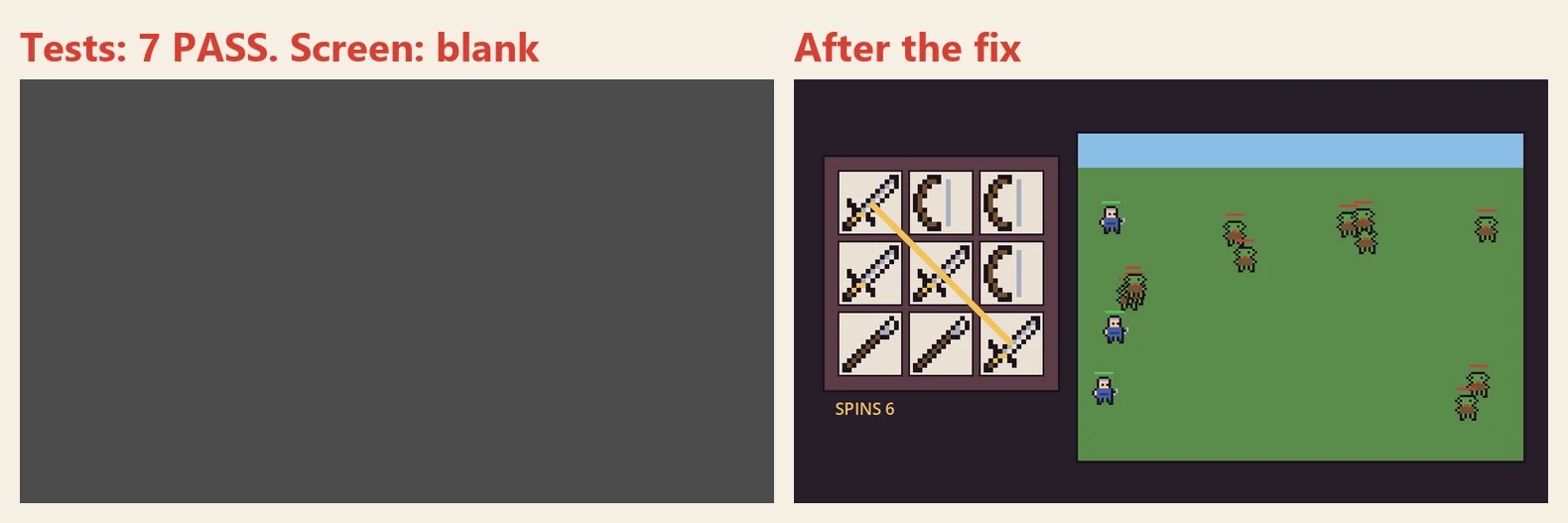
1. Tests pass, game is a blank grey screen
- What I did: ran the 7 headless tests (all PASS), then rendered
  the screenshot check.
- What I expected: the reel grid on the left and the battlefield
  on the right.
- What happened: every frame is flat grey. Godot log:
  Parse Error: Cannot infer the type of "key" variable in main.gd,
  so the drawing script never loaded.
- Why the tests missed it: they only load slots.gd and battle.gd;
  main.gd is drawing code with no tests.
- Fix: give `key` an explicit type (var key: String = ...).
The fix was one line. Finding it without the screenshot step would've meant running the game by hand after every change, and that's the habit people drop by day three.
Part 4: The prompts I use with Claude Code
Every one of these starts by pointing at the rules file, so the agent works the same way each time. Fill in the brackets.
The bug report
This is the format from the rules file, and it's the one I'd use every single time something breaks. What you did, what you expected, what actually happened. The more exact the "what happened" line is, the faster the fix.
Read RULES.md first.

Bug report:
- What I did: [the exact steps, e.g. "ran the tests (all PASS), then
  rendered the screenshot check"]
- What I expected: [what should have been on screen or in the output]
- What happened: [what you actually saw. Paste the exact error line
  from the log, and attach the screenshot if it's visual]

Don't change any code yet. Tell me:
1. What you think is causing it, and which file and line
2. Why the tests didn't catch it
3. The smallest fix you'd make
I'd keep the "don't change any code yet" line. Reading the cause back first tells you whether it understood the problem, and it's cheaper to correct a wrong guess before it edits five files.
The fix
Read RULES.md first. Make the fix you described for [the bug].

1. If the bug is in a logic file, add a test that fails now and
   passes after the fix. If it's in drawing code, say so instead.
2. Make the smallest change that fixes it. Don't refactor anything
   else.
3. Run the tests. Every test must pass.
4. Run the screenshot check and look at the frames against step 3
   of RULES.md.
5. Add an entry to BUGLOG.md in the bug report format, plus
   "Why the tests missed it" and "Fix".

Don't tell me it's fixed until steps 3 and 4 both pass.
A new feature, with tests first
Read RULES.md first. I want to add: [the feature in one or two
sentences, e.g. "a fourth symbol, SHIELD, that summons a slow tank
unit with high hp"].

1. Tell me which files change, and confirm the rules stay in the
   logic files and out of [main file].
2. Write the tests for it first and run them. They should fail.
3. Build it until the new tests and all the old tests pass.
4. Run the screenshot check. Tell me what's on screen and whether
   it matches step 3 of RULES.md.
5. If this changes anything in RULES.md (a new file, a new rule),
   update RULES.md too.

Keep any randomness seeded. Don't change [fixed sizes or formats].
I think step 5 matters more than it looks. If the rules file goes out of date, every later session works from a wrong picture of the game.
The screenshot check on its own
Use this after any change that touches what's on screen, or when something just looks off.
Read RULES.md first. Run the screenshot command from "After every
fix", then open the first, middle and last frames.

For each one, check every item in step 3 of RULES.md and give me a
line per item: PASS or FAIL, and what you actually see. Then list
anything else that looks wrong: overlapping elements, text cut off,
things off screen, a flat or empty frame.

If the frames are blank or the game didn't start, read the Godot log
output and find the first error before anything else.
Before you submit for review
This one is for the build review. It turns your store page into a list of claims, and each claim into a test you can run.
Here's my Steam store page text:

[paste the description, feature list, supported languages,
controller support, cloud saves and achievements]

List every claim the page makes about the game. For each one, tell
me how to check it in the current build, and check the ones you can
from the code. Flag anything the build doesn't support yet, any
price written in the text, and anything a reviewer would see on a
fresh install that doesn't match the page.
Check it worked: you've run the bug report and the fix prompts on one real bug, and it ended with a BUGLOG.md entry and both checks passing.
Part 5: AI disclosure and who owns your art
Valve rewrote its AI disclosure form in mid-January 2026. Coding assistants and other behind-the-scenes tools are now clearly outside it. What it covers is AI content that ships with the game and that players see or hear.
- Pre-generated content is anything made with AI during development that players consume: art, sound, text, voice.
- Live-generated content is anything AI makes while the game is running. For that, Valve also asks what guardrails you've put on it so it can't make illegal content.
- Valve says it reviews AI-made content the same way it reviews everything else.
So if Claude Code wrote your code, that alone isn't something you disclose. If AI made art, sound or text that players see, you disclose it. Slotbound's store page discloses AI for some visual assets and promotional material, and that matches the rule.
On ownership: the US Copyright Office said in its January 2025 report that prompts alone don't give enough human control for authorship. Your own selection, arrangement or editing can be protected, but raw AI output isn't. So I'd lean on bought asset packs and hand-edited art, the way Slotbound did, and use AI to fill gaps. The more of your art that's yours or licensed, the safer you are.
Part 6: The honest odds
I don't want to sell you a dream, so here are the numbers I'd plan around.
Most Steam games make very little. Gamalytic estimated that about 65.9% of 2025 Steam releases earned under $1,000, about 40% hadn't earned back the $100 fee, and only about 8% grossed over $100,000. Gamalytic says its estimates can be off by up to 50%, so treat these as rough, but the shape is clear.
Slotbound's wishlists were an outlier. It sold about twice its 100,000 wishlists in its first week. The benchmark people usually quote is first-week sales of about a tenth to a fifth of wishlists. I couldn't trace that to a primary source, and Valve itself says wishlists can't accurately predict sales, so use it as a rough guide and nothing more.
The algorithm bar went up. People used to say you needed about 7,000 wishlists to show up in Steam's Popular Upcoming list. Chris Zukowski, who studies Steam marketing, estimated in June 2026 that it's now somewhere around 100,000. So I wouldn't count on Steam to find you. I'd count on the demo.
It took 13 months of work. Not a weekend, and not one prompt. AI wrote the code, but he made every decision, patched the demo about 15 times and pushed more than ten fixes in launch week.
The review can cost you the launch. The documented review time is days. His took 13 days, then a rejection.
Out of 100 Steam games released in 2025, by Gamalytic's estimate
  about 66 made under $1,000
  about 40 didn't earn back the $100 fee
  about  8 grossed over $100,000
So what did Slotbound do differently? I think it's three things. One hook you can explain in a sentence. A free demo months before launch that he kept improving in public. And thirteen months of actually finishing the game, with AI writing the code and him deciding everything else. None of that is guaranteed to work for you, and I'd plan your money as if the game lands in the 66, not the 8.
Check it worked: you've written your game's hook as one sentence, picked a launch month, and counted back from it with the countdown table.
Your first week
Day 1  Write the one-line hook. If you need a paragraph, cut the idea
       down until one person can finish it.
Day 2  Pick a text-based engine. Ask Claude Code to scaffold the
       project with the logic, drawing and test files kept separate.
Day 3  Fill in the RULES.md template. Add the test and screenshot
       commands, and run both once so you know they work.
Day 4  Build the core loop with the "Add a feature" prompt. Tests
       first, then the code, then the screenshot check.
Day 5  Break something on purpose and run the bug report and fix
       prompts, so the loop is a habit before you need it.
Day 6  Start Steamworks onboarding and pay the $100 fee. The tax
       check and the 21-day wait start running now.
Day 7  Put the launch countdown on a real calendar, with your Next
       Fest dates if you're aiming at one.
What I'd do differently
Start onboarding on day one. The fee, the tax check and the 21-day wait don't care how far along the game is, so I'd get them running while you build.
Put the screenshot check in the rules file from the start. My first real bug passed every test. If the check hadn't been a rule, I'd have found it much later.
Keep the rules file up to date. Every time a new file or a new rule shows up, it goes into RULES.md in the same change. An old rules file is worse than none, because the agent trusts it.
Submit the build a month early, and test it like a stranger. Install it fresh, hit Play, and check that everything the store page promises actually works. That's the step that cost Slotbound its launch date.
FAQ
How long does it take to release a game on Steam?
Longer than people expect. The tax check can take up to 30 days, first-time developers wait 21 days after paying the app fee, the Coming Soon page has to be public for at least two weeks, and Valve says the store page should go in for review at least 7 business days before it goes live. Valve puts build review at 1 to 5 days, but Slotbound's first review took 13 days and was rejected. I'd have the build in review at least a month before launch day.
How much does it cost to put a game on Steam?
The Steam Direct fee is $100 per game. You can't get it refunded, but Valve pays it back in a later payout once the game reaches $1,000 in adjusted gross revenue. After that, Valve takes 30% of revenue up to $10 million, as reported when it introduced its tiers in 2018.
Do I have to disclose AI on Steam if AI wrote my code?
Not for the code alone. Valve rewrote its AI disclosure form in mid-January 2026 so that coding assistants and other behind-the-scenes tools are out of scope. What you disclose is AI content that ships with the game and that players see or hear, like art, sound or text, and anything AI generates while the game is running.
Did Slotbound use Claude?
No. Its developer used GitHub Copilot and then two OpenAI Codex accounts. Claude isn't mentioned in any source. The Claude Code and Godot setup in this kit is my own, from a small prototype I built to test the workflow.
What is a rules file for an AI coding agent?
It's a short document at the top of your project that the agent reads before every change. It says what the game is, where each kind of code lives, what the agent must never do, and what has to pass before a fix counts as done. Mine makes the agent run the tests and a screenshot check after every fix.
How do I write a bug report for Claude Code?
Three lines: what you did, what you expected, and what actually happened, with the exact error from the log and a screenshot if it's visual. Then ask it to explain the cause and the smallest fix before it changes any code. The developer of Slotbound said what he had to master wasn't coding syntax but how to explain problems accurately.
When is the next Steam Next Fest?
22 February to 1 March 2027. Registration closes on 10 January 2027 and submissions are due on 8 February, according to Steamworks. The one after that runs 14 to 21 June 2027.
How many Steam games make money?
Not many. Gamalytic estimated that about 65.9% of 2025 Steam releases earned under $1,000, about 40% hadn't earned back the $100 fee, and about 8% grossed over $100,000. It says its estimates can be off by up to 50%, so treat them as rough.
Related guides
Get the next build in your inbox
One email a week: the newest guides, plus one thing I only share with the list.
No spam. Unsubscribe anytime.

I can build this for you.
If you would rather not do the steps yourself, tell me what you need and I will show you how I would approach it.